
Many small businesses run on a mix of separate tools: accounting software, inventory spreadsheets, a CRM and an online store. Each one works on its own. Together they mean entering data twice, waiting on reports, and making decisions without the full picture.
Oracle NetSuite ERP replaces that patchwork with one cloud platform for finance, inventory, sales, CRM and reporting. It’s used by more than 44,000 organizations. The real question for a small business isn’t whether NetSuite is capable. It’s whether you need that capability yet, and what it will cost.
This guide explains who NetSuite for small business suits, what it costs in year one, how it compares with QuickBooks, Odoo and Business Central, and how to implement it without overspending.
Quick answer: is NetSuite worth it for a small business? NetSuite is usually worth it once you manage inventory across channels, run more than one entity or location, or have about 10 or more finance and operations users. Plan for a first-year budget of roughly $49,000–$86,000 USD. Below that level of complexity, QuickBooks, Odoo, or the free NetSuite QuickStart (for eligible US tech startups) is usually the better fit.
Is NetSuite Suitable for Small Businesses and Startups?
Yes, for small businesses whose operations have become complex. NetSuite is a good fit when finance, inventory, orders and customer data need to work together and your current tools can’t keep up. It’s often too much for a company with simple bookkeeping, one location and a small team.
Fit depends on four things: company size, operational complexity, budget and growth plans.
Small Businesses That Benefit Most from NetSuite
- Growing retail and eCommerce businesses: online orders, product catalogs, inventory and several sales channels connected in one system.
- Wholesale and distribution companies: large inventories, supplier relationships, purchase orders and warehouse operations.
- Manufacturing businesses: production planning, raw materials, work orders and procurement, all tied to financials.
- Professional services companies: consulting firms, IT providers and agencies that manage projects, time, expenses and billing in one place.
- Businesses with multiple locations or entities: consolidated financials and inventory visibility across branches or legal entities.
- Fast-growing startups: teams that want structured finance and operations processes before growth makes them harder to set up.
Businesses That May Not Need NetSuite Yet
- Basic accounting needs: invoices, expenses, bank feeds and standard reports are handled well by accounting software.
- Limited inventory: a small product range with low order volume doesn’t need advanced warehouse features.
- A tight budget: subscription, implementation and support add up (see the cost section below).
- Simple workflows: one location, a small team and straightforward processes.
- No capacity for an ERP project: implementation takes planning, data migration, configuration, testing and training time.
If your current tools handle daily operations well, upgrading now may not pay for itself. Choose an ERP for the requirements you have, not just the ones you expect.
Get expert guidance on choosing the right NetSuite modules and setup for your business needs. Our consultants help you plan an ERP solution that supports your current operations and future growth.
Talk to NetSuite ConsultantsNetSuite for Startups vs. Established Small Businesses
Startups usually need clean finances, customer records and sales tracking. Established small businesses need tighter control over inventory, procurement, approvals and multiple departments. NetSuite supports both stages, but the scope and approach are different.
| Business requirement | Startups | Established small businesses |
|---|---|---|
| Financial management | Initial accounting, expenses and cash flow | Complex financial operations and reporting |
| Inventory management | A limited product range, if any | Larger inventories, warehouses and stock movements |
| Customer management | Customer records and sales activity | Larger customer bases and sales processes |
| Automation | Basic financial and admin tasks | Approvals, order processing and departmental workflows |
| Reporting | Revenue, expenses and basic KPIs | Financial, inventory, sales and operational analysis |
| Integrations | Essential business apps | Multiple platforms across departments |
| Scalability | Processes that support future growth | New locations, entities and business units |
For startups, the priority is a reliable foundation without unnecessary cost or complexity. For established small businesses, NetSuite makes sense when rising transaction volumes and more departments make separate applications inefficient.
NetSuite QuickStart: The Free Option for Startups
On October 14, 2026, Oracle NetSuite announced NetSuite QuickStart, a free, AI-first financial platform for eligible early-stage technology startups in the United States. It uses embedded AI to automate accounting, banking, accounts payable and receivable, and subscription management. It also tracks startup metrics such as MRR, burn rate and runway.
QuickStart is free within monthly usage limits and is designed as an on-ramp: startups can move to full NetSuite as they scale. It is not the same product as SuiteSuccess Starter Edition. If you’re a US tech startup, check QuickStart eligibility before paying for a full ERP. Other businesses should compare SuiteSuccess editions.
Key NetSuite Features for Small Businesses
The exact features you get depend on your NetSuite edition and modules. These are the capabilities small businesses use most. For a deeper breakdown, see our guide to the top NetSuite ERP features.
Financial Management and Accounting
- General ledger: record transactions and keep organized accounting records.
- Accounts payable: track supplier bills, due dates and outstanding amounts.
- Accounts receivable: create invoices, monitor unpaid balances and manage collections.
- Cash management: track cash flow and bank transactions.
- Financial reporting: review revenue, expenses and profit.
- Budgeting and forecasting: compare actual results with targets.
Example: a small wholesaler tracks customer payments, supplier bills and operating costs in one system. The finance team gets a clear view of cash flow without maintaining separate spreadsheets.
Inventory and Order Management
Without accurate stock data, businesses overstock, run out, ship late or carry wrong records. NetSuite connects inventory and sales orders:
- Real-time inventory tracking across locations.
- Stock replenishment with reorder points.
- Order processing from order entry to fulfillment and invoicing.
- Warehouse management for receiving, picking, packing and shipping.
- Returns management with the related inventory and financial entries.
- Inventory reporting on stock levels and product movement.
Example: an online electronics store updates inventory as items sell, so it stops selling out-of-stock products.
Customer Relationship Management (CRM)
NetSuite CRM keeps customer data next to orders and invoices:
- Customer records with contact details and communication history.
- Sales opportunities tracked through the pipeline.
- Lead management for new inquiries.
- Sales activities such as calls, meetings and tasks.
- Customer service cases and requests.
- Marketing campaigns and engagement tracking.
Already using another CRM? You can integrate NetSuite with your CRM instead of replacing it.
Procurement and Supplier Management
Manual purchasing leads to duplicate orders, missed approvals and little visibility into spend. NetSuite provides:
- Supplier records with payment terms and transaction history.
- Purchase orders for products and services.
- Purchase approvals before orders are placed.
- Three-way matching of supplier invoices, purchase orders and received goods.
- Purchase tracking for deliveries and open orders.
- Spend reports by supplier.
Procurement data also feeds into NetSuite supply chain management.
eCommerce and Sales Management
NetSuite connects product, customer, inventory and order data across your website, marketplaces and physical stores:
- Product management: details, descriptions and pricing.
- Order management from placement to fulfillment.
- Inventory synchronization across connected channels.
- Customer order history in one record.
- Returns and refunds.
Businesses selling online can use NetSuite SuiteCommerce or connect an existing store. Learn more about omnichannel commerce with NetSuite.
Reporting and Business Analytics
Dashboards, saved searches, reports and SuiteAnalytics Workbooks give you one view across departments:
- Financial reports: income statement, balance sheet and cash flow.
- Sales reports: revenue trends, customer activity and order performance.
- Inventory reports: stock levels and availability.
- Role-based dashboards for each employee.
- KPIs such as revenue, expenses, overdue invoices and sales performance.
- SuiteAnalytics Workbooks for detailed custom analysis.
Example: an owner checks monthly sales, overdue payments and available stock on one dashboard instead of pulling numbers from three spreadsheets.
Workflow Automation
NetSuite’s SuiteFlow tool automates routine steps based on rules you define:
- Purchase approvals routed to the right manager.
- Sales order actions triggered at specific stages.
- Invoice and billing approvals.
- Customer follow-up tasks for sales teams.
- Automatic record updates when conditions are met.
- Alerts and notifications for pending actions.
Example: a distributor sends every purchase order above a set amount to a manager for approval before it’s processed.
Automate your actual processes only. Automating poorly defined steps adds complexity instead of removing it.
Cloud Access, Mobile and Security
NetSuite is cloud-native, so teams can securely access it from any browser or through the NetSuite mobile app. Oracle handles hosting, updates and backups. You control access through role-based permissions and audit trails. Learn how cloud NetSuite compares with on-premise ERP.
What These Features Mean for Your Business
- One platform: shared data across finance, sales and operations.
- Less manual work: fewer re-keyed entries and spreadsheet errors.
- Better cash flow visibility: payables, receivables and cash in one place.
- Faster decisions: live reports instead of month-end compilations.
- Room to scale: add modules, users and integrations without replacing your ERP.
Scalability doesn’t mean buying everything on day one. Start with what you need and add the rest as you grow.
From financial management and inventory to CRM and workflow automation, our NetSuite experts help you configure and customize the platform around your business processes.
Explore NetSuite ServicesNetSuite SuiteSuccess Starter Edition: What Small Businesses Should Know
SuiteSuccess is NetSuite’s preconfigured, industry-based approach to deployment. SuiteSuccess Starter Edition is the version for small, fast-growing businesses. It comes with ready-made processes, workflows, KPIs, reports and role-based dashboards, so you don’t build everything from scratch.
What Does SuiteSuccess Starter Edition Include?
What’s included depends on the edition and your region. Common capabilities:
- Financial management: AP, AR, general ledger, budgeting and cash flow.
- Reporting and dashboards: predefined reports, KPIs and role-based views.
- Inventory management: products, stock levels and locations (product-based editions).
- Order management: customer orders, purchasing and fulfillment.
- CRM: customer records and sales activities.
- Project management: project tracking, time, expenses and billing (service-based editions).
SuiteSuccess Industry Editions
SuiteSuccess is available in industry-specific editions, including:
- Financials First
- Wholesale Distribution
- Manufacturing
- Retail
- Software / SaaS
- Services
- Food & Beverage
- Apparel, Footwear & Accessories
Edition names and availability vary by region. Confirm current options with Oracle or your partner.
How SuiteSuccess Helps Small Businesses
- Faster implementation: preconfigured processes shorten setup.
- Visibility from day one: dashboards and reports are ready at go-live.
- Consistent processes: standard workflows reduce ad-hoc work.
- Room to grow: add modules as operations become more complex.
Is SuiteSuccess Starter Edition Right for Your Business?
It suits a small business that has outgrown basic accounting software and needs better control of finance, inventory, projects or sales. A distributor might prioritize purchasing, inventory and financial reporting. A services firm might prioritize projects, time tracking and billing. If you’re an early-stage US tech startup, compare it with the free NetSuite QuickStart first.
NetSuite vs. QuickBooks vs. Other Small Business Software
Some small businesses only need accounting software. Others need a full ERP. Here’s how NetSuite compares with QuickBooks, Odoo and Microsoft Dynamics 365 Business Central.
NetSuite vs. QuickBooks
QuickBooks is accounting software for invoices, expenses, payments, payroll and financial reports. It’s easier to start with and costs much less. NetSuite is a full ERP that connects accounting with inventory, procurement, order processing and CRM.
| Comparison | NetSuite | QuickBooks |
|---|---|---|
| Main purpose | Complete cloud ERP | Accounting and financial management |
| Accounting | Advanced financials, multi-entity, consolidation | Bookkeeping, invoicing, expenses and reports |
| Inventory | Advanced inventory and warehouse modules | Basic inventory tracking (higher plans) |
| CRM | Built in | Usually a separate CRM |
| Order management | Connected order-to-fulfillment | Sales transactions and invoicing |
| Customization | Extensive (configuration, SuiteScript) | More limited (more on the Advanced plan) |
| Scalability | Complex and multi-entity operations | Small businesses with simple needs |
| Cost | Higher subscription plus implementation | Lower entry cost |
Which to choose: a small consulting firm with a few staff is usually fine on QuickBooks. A distributor with several warehouses, suppliers and sales channels benefits from NetSuite.
NetSuite vs. Odoo
Odoo is a modular platform with apps for accounting, CRM, sales, inventory, purchasing, manufacturing and eCommerce. The Community edition is open source, and Enterprise is paid. NetSuite offers a more integrated ERP for advanced finance, multiple entities and business-wide reporting.
| Comparison | NetSuite | Odoo |
|---|---|---|
| Main purpose | Integrated cloud ERP | Modular business management / ERP |
| Accounting | Advanced financial management | Accounting apps |
| Inventory | Advanced inventory and warehouse | Inventory and stock tracking |
| CRM | Built in | Dedicated CRM app |
| eCommerce | NetSuite Commerce and integrations | Built-in eCommerce app |
| Customization | Configuration, SuiteScript, integrations | Custom modules, Odoo Studio, development |
| Deployment | Cloud SaaS | Cloud or self-hosted, depending on edition |
| Pricing model | Annual subscription by users and modules | Free Community edition plus paid plans |
Which to choose: a startup that needs basic accounting, CRM and inventory apps can look at Odoo. Our Odoo integration services cover that route. A company managing several subsidiaries and complex reporting is a better fit for NetSuite.
NetSuite vs. Microsoft Dynamics 365 Business Central
Business Central is Microsoft’s ERP for small and midsize businesses. Its main advantage is working closely with Excel, Outlook, Teams and the wider Microsoft Dynamics 365 ecosystem.
| Comparison | NetSuite | Business Central |
|---|---|---|
| Main purpose | Cloud ERP for growing, complex businesses | ERP for small and midsize businesses |
| Financials | Advanced, multi-entity | Accounting, budgeting and reporting |
| Inventory | Advanced inventory and warehouse options | Inventory and supply chain |
| CRM | Built in | Basic contacts; Dynamics 365 Sales for full CRM |
| Reporting | Reports, dashboards, SuiteAnalytics | Built-in reports plus Power BI |
| Customization | SuiteScript, configuration, SuiteApps | Extensions built in AL |
| Integrations | APIs, SuiteApps, third-party connectors | Strong Microsoft 365 integration |
| Scalability | Complex operations, multiple subsidiaries | Growing SMBs |
Which to choose: a Microsoft-centric team may prefer Business Central. A business expanding across countries or subsidiaries usually gets more from NetSuite.
Which Option Is Best for a Small Business?
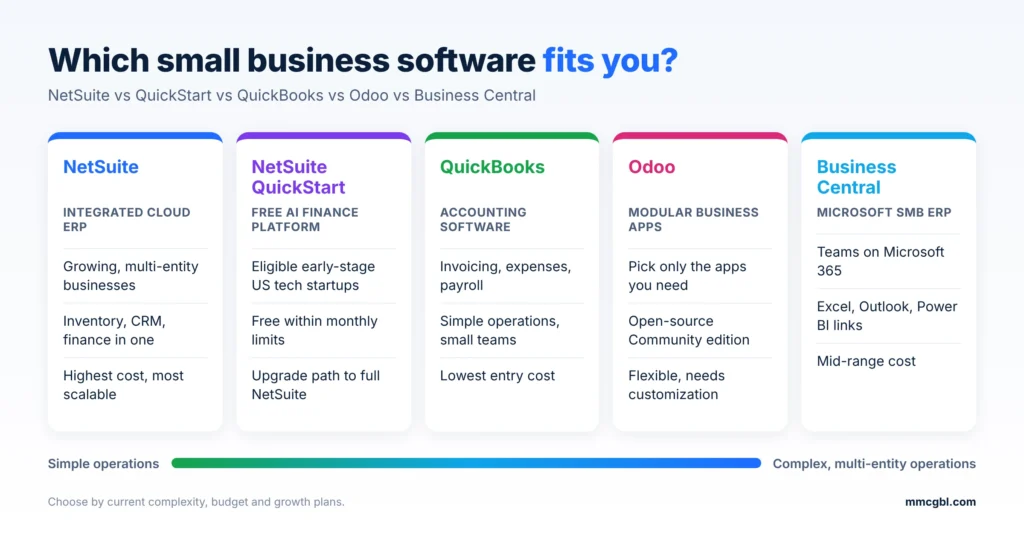
NetSuite vs QuickStart vs QuickBooks vs Odoo vs Business Central comparison for small businesses{width=6.5in}
How NetSuite compares with other small business software.
| Software | Best for |
|---|---|
| NetSuite | Growing businesses that need an integrated ERP with advanced finance and operations |
| NetSuite QuickStart | Eligible early-stage US tech startups that want free, AI-driven finance |
| QuickBooks | Businesses that mainly need accounting, invoicing and expenses |
| Odoo | Startups and small businesses that want a modular, customizable platform |
| Business Central | SMBs that want ERP closely tied to Microsoft 365 |
How Much Does NetSuite Cost for a Small Business?
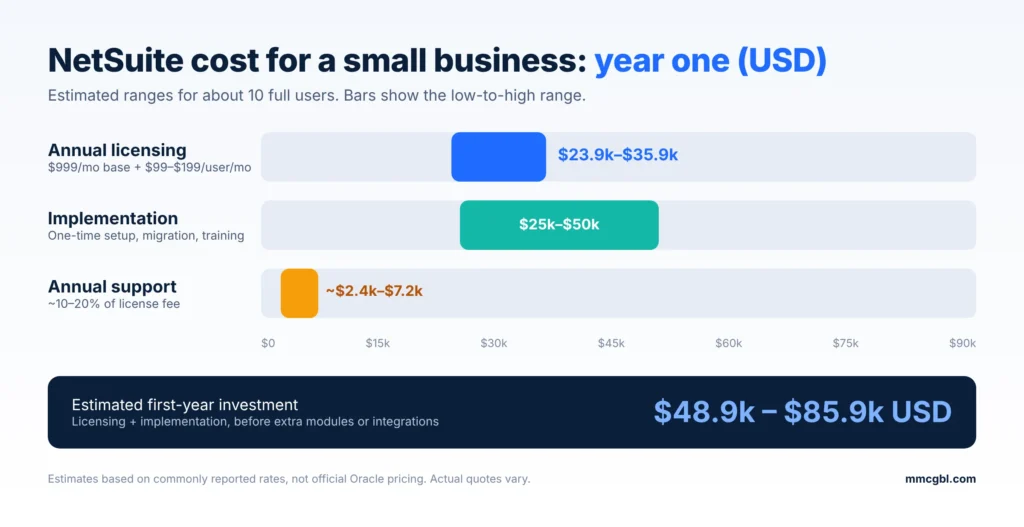
There’s no fixed price. Cost depends on your subscription, number of users, modules and implementation scope. Plan for three cost categories: annual licensing, one-time implementation, and ongoing support. All figures below are in US dollars (USD).
Estimated first-year NetSuite cost for a 10-user small business in USD{width=6.5in}
Estimated year-one NetSuite cost for about 10 users (USD).
NetSuite Licensing and Subscription Costs
NetSuite is sold as an annual subscription. Oracle doesn’t publish a public price list, so you need a custom quote from NetSuite or a partner. NetSuite’s own ERP pricing guide explains how licensing is structured. The subscription is made up of:
- Base platform license: core platform access.
- User licenses: priced by number and type of users.
- Additional modules: such as advanced inventory, manufacturing or multi-subsidiary management (OneWorld).
- Support tier: standard or premium support.
NetSuite rates at a glance (USD, commonly reported estimates):
| Cost item | Typical rate (USD) |
|---|---|
| Base platform license | ~$999 USD per month (~$11,988 USD per year) |
| Full user license | ~$99–$199 USD per user per month |
| 10 full users (licensing, per year) | ~$23,900–$35,900 USD |
| Implementation (small business) | ~$25,000–$50,000 USD one-time |
| Standard support | ~10%–20% of the annual license fee |
| Estimated first-year total (10 users) | ~$48,900–$85,900 USD |
Estimate for 10 full users: about $23,900–$35,900 USD a year. This is based on commonly reported rates of roughly $999 USD a month for the base platform plus $99–$199 USD per full user per month. It’s an estimate, not an official Oracle price, and actual quotes vary.
Implementation and Customization Costs
Implementation turns the subscription into a working system. It typically covers:
- Requirements analysis: mapping current processes and must-have features.
- System configuration: records, roles, workflows and dashboards.
- Data migration: customers, suppliers, items, balances and open transactions.
- Integrations: eCommerce, CRM, payments and other apps.
- Customization: scripts, workflows or reports where standard features fall short.
- Testing and training.
Estimate for a small business with straightforward needs: about $25,000–$50,000 USD. Projects with multiple integrations, custom development or several entities cost more. NetSuite’s own breakdown of implementation costs explains each phase.
Additional Modules, Users and Support Costs
| Additional cost | Why you may need it |
|---|---|
| Additional user licenses | Give more employees access |
| Advanced inventory | Complex stock, warehouse and inventory processes |
| Manufacturing modules | Production planning and work orders |
| Multi-subsidiary (OneWorld) | Financials across several companies or countries |
| Third-party integrations | eCommerce, CRM, payment and other apps |
| Custom development | Specific features, scripts, reports or workflows |
| Ongoing support | Issues, updates, configuration changes and improvements |
| Employee training | Onboarding new and existing staff |
Standard support commonly runs 10%–20% of the annual license fee, and premium or managed tiers cost more.
Factors That Affect the Total Cost
- Number of users: more full users means a higher subscription.
- Business requirements: complex finance or inventory needs require extra modules.
- Customization level: scripts and custom reports add development and testing.
- Integrations: each connected system adds setup and maintenance.
- Data migration volume: more historical data means more work.
- Number of subsidiaries: multiple legal entities need more configuration.
- Support and training: ongoing help adds to annual cost.
Example first-year budget (10 users): licensing $23,900–$35,900 USD + implementation $25,000–$50,000 USD = about $48,900–$85,900 USD, before extra modules, integrations or support upgrades. Your final quote depends on scope.
How to control cost: start with the features you need now, avoid unnecessary customization, plan upgrades in phases, and ask for quotes that separate licensing, implementation and support so you can compare providers.
Understand the licensing, implementation, and customization costs before getting started. Discuss your requirements with our team and get guidance on a NetSuite solution that fits your budget.
Request a NetSuite ConsultationSigns Your Small Business Has Outgrown Its Current Software
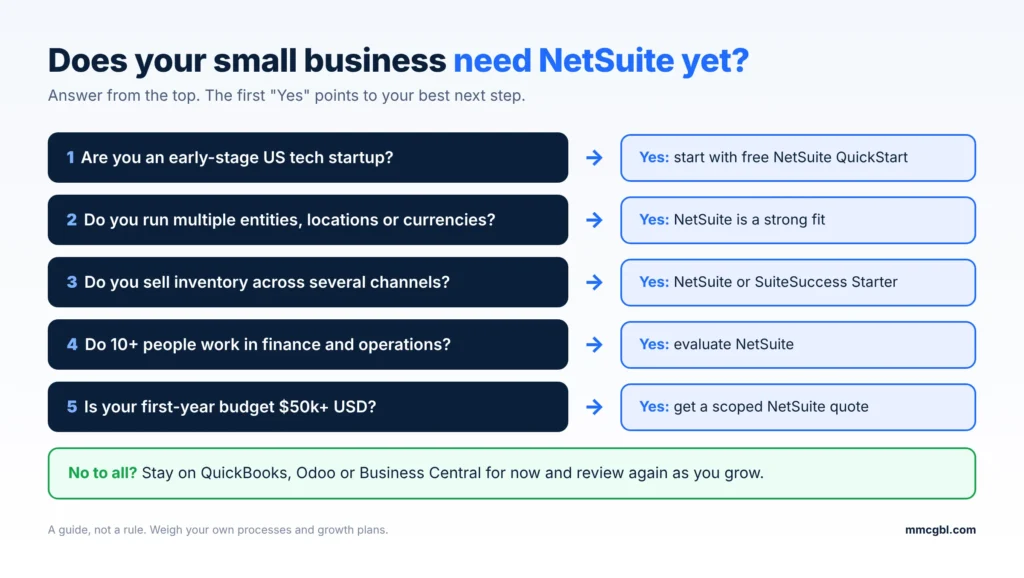
Flowchart to decide if a small business needs NetSuite ERP{width=6.5in}
Use this quick check to see whether NetSuite fits your business today.
- Disconnected systems: accounting, inventory, sales and CRM sit in different tools, and staff enter the same data more than once.
- Too much manual work: hours go into updating spreadsheets, processing invoices and checking records.
- Slow reporting: every financial or operational report means pulling data from several applications.
- Inventory and order errors: stockouts, wrong stock counts, late deliveries and order mistakes keep happening.
- Expansion pressure: new branches, product lines or international sales need multi-currency, consolidation and better controls.
- Integration limits: your tools don’t connect easily with your CRM, eCommerce store or payment systems.
- Feature or user limits: you need more reporting, automation, customization or users than your current plan allows.
When should you upgrade? If several of these signs affect daily operations, evaluate an ERP such as NetSuite. Compare the cost of the new system with the time, errors and lost opportunities your current setup causes.
NetSuite Pros and Cons for Small Businesses
| Pros | Cons |
|---|---|
| One platform for finance, inventory, CRM and orders | Higher first-year cost than accounting software |
| Real-time dashboards and reporting | Implementation takes time and planning |
| Strong multi-entity and multi-currency support | Teams need training to adopt it well |
| Scales by adding modules without replatforming | Customization and integrations add ongoing cost |
| Cloud-based, with Oracle handling updates and hosting | Annual contracts and renewal increases to negotiate |
| Large partner and SuiteApp ecosystem | Can be more than a very simple business needs |
How to Manage the Main Challenges
- High initial investment: license only the modules and users you need now.
- Implementation complexity: set a clear scope and timeline, and use SuiteSuccess where it fits.
- Training and adoption: provide role-based training, short guides and post-launch support.
- Ongoing maintenance: prefer standard features to custom code, and review the system regularly as the business changes.
Migrating to NetSuite from QuickBooks, Xero or Spreadsheets
From QuickBooks:
- Move from bookkeeping to full ERP: inventory, procurement and CRM in one system.
- Automate multi-entity accounting, approvals and consolidations.
- Migrate the chart of accounts, open AR/AP, customers, vendors and items, plus summarized history.
From Xero, Zoho Books or FreshBooks:
- Replace add-on apps with native inventory, order management and CRM.
- Gain multi-currency, multi-subsidiary and stronger audit trails.
- Recreate bank rules and recurring billing in NetSuite.
From Sage or desktop software:
- Move from on-premise to cloud, with automatic updates.
- Clean master data before migrating to avoid carrying over duplicates.
From spreadsheets:
- Replace manual consolidation with live dashboards.
- Define item, customer and vendor records properly before importing.
Whatever you’re moving from, clean your data first and decide how much history you really need. Read more about data migration in a NetSuite implementation.
How to Implement NetSuite in a Small Business
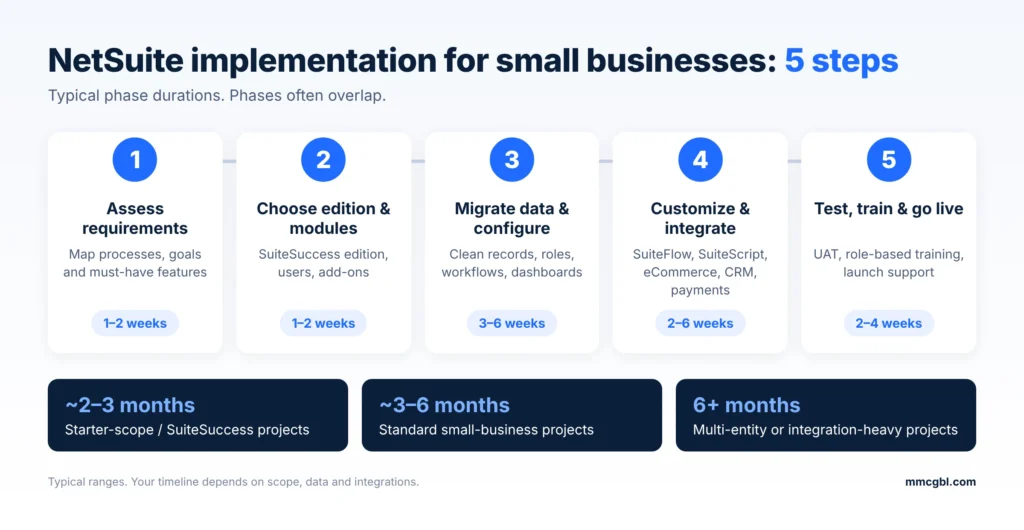
A structured plan reduces errors, controls cost and makes the switch easier. For a detailed walkthrough, see our NetSuite implementation guide.
Typical timelines:
- Starter-scope / SuiteSuccess projects: often about 2–3 months.
- Standard small-business projects: about 3–6 months.
- Multi-entity or integration-heavy projects: 6 months or more.
NetSuite implementation steps and timeline for small businesses{width=6.5in}
The five NetSuite implementation steps and typical durations.
1. Business Requirements Assessment
Review your current accounting, inventory, sales, procurement and customer processes. List the tools you use, the manual tasks to automate, and the problems each department faces. Agree on clear goals with every department before you choose modules.
2. Select the Right NetSuite Edition and Modules
Match the edition and modules to your industry, size, budget and plans. A retailer may need financials, inventory and order management. A services firm may need projects, time tracking and billing. Start with the essentials and add the rest later.
3. Data Migration and System Configuration
Clean customer, supplier, product and financial records, removing duplicates and outdated entries, before you migrate. Then configure roles, permissions, financial settings, workflows, dashboards and reports.
4. Customization and Integration
Use standard features first. Where you need more, configure custom reports, dashboards and SuiteFlow workflows, or build features with SuiteScript (see our NetSuite development guide). Connect eCommerce, payment gateways, CRM and other apps. Our guide to NetSuite integration for small businesses covers the common options. Keep customization to what’s essential so maintenance stays simple.
5. Testing, Training and Go-Live
Test financial transactions, sales orders, inventory updates, reports, permissions, integrations and workflows. Train each role on the features it uses. After go-live, monitor performance, collect feedback and fix issues quickly.
Get support with NetSuite implementation, data migration, system integration, customization, and ongoing optimization. Let our experienced team help you build an ERP system that grows with your business.
Get NetSuite Implementation SupportHow to Choose the Right NetSuite Implementation Partner
The right partner helps you choose modules, configure the system, migrate data and connect your other applications. When comparing partners, check:
- Proven NetSuite experience: implementation, customization, SuiteScript, SuiteFlow and SuiteTalk integrations.
- Industry knowledge: familiarity with businesses like yours.
- A clear method: how they handle requirements, migration, configuration, testing and training.
- Integration skills: with your CRM, eCommerce and other systems.
- Transparent pricing: separate estimates for implementation, customization and support.
- References: client reviews and similar past projects.
- Post-launch support: help to optimize the system as you grow.
NetSuite for Small Businesses in the UAE and GCC
Businesses in the UAE and wider GCC have extra requirements to plan for:
- VAT: configure UAE VAT (5%) tax codes and returns correctly from day one.
- E-invoicing: plan for the UAE’s e-invoicing rollout and check current Federal Tax Authority timelines.
- Multi-currency: handle AED, USD and other currencies with automatic revaluation.
- Multiple entities: consolidate free-zone and mainland companies with NetSuite OneWorld.
- Local support: choose a partner in your time zone who knows regional compliance.
MMC Global helps small and growing businesses plan, implement and support NetSuite. Explore our NetSuite development services or our wider Oracle consulting services.
Frequently Asked Questions
1. Is NetSuite good for small businesses?
Yes, for growing small businesses that need accounting, inventory, sales and CRM in one system, especially those with multiple channels, locations or entities. Businesses with simple bookkeeping usually get better value from accounting software such as QuickBooks.
2. How much does NetSuite cost for a small business?
For about 10 users, expect roughly $23,900–$35,900 USD a year for licensing and $25,000–$50,000 USD for implementation, so about $49,000–$86,000 USD in year one. Support usually adds 10%–20% of the license fee each year. Oracle prices every deal individually, so get a custom quote.
3. What is the difference between NetSuite and QuickBooks?
QuickBooks is accounting software for invoicing, expenses and financial reports. NetSuite is a full cloud ERP that adds inventory, procurement, CRM, order management and multi-entity financials.
4. Can startups use NetSuite?
Yes. Eligible early-stage US technology startups can use NetSuite QuickStart for free (launched October 2026). Other startups can start with SuiteSuccess Starter Edition. Very early companies with simple needs may be better served by basic accounting software until complexity grows.
5. How long does it take to implement NetSuite?
Starter-scope projects often go live in about 2–3 months. Standard small-business projects take about 3–6 months. Multi-entity or integration-heavy projects can take 6 months or more.
6. Does NetSuite support inventory and order management?
Yes. NetSuite tracks stock across locations, manages sales orders, monitors availability, and handles fulfillment and returns.
7. Can NetSuite grow with a small business?
Yes. You can add modules, users, subsidiaries and integrations as requirements change, without replacing your ERP.