
Most of your customers’ phone time already happens inside apps. Sensor Tower’s State of Mobile 2026 report found that people spent 5.3 trillion hours in apps last year, roughly 3.6 hours per mobile user per day. And with 91% of US adults owning a smartphone, according to Pew Research Center, the people you sell to, and the people who work for you, are already on their phones all day.
So is a mobile app a smart investment for your business? It depends on what the app does. Most apps lose the majority of new users within the first month, so an app that’s only a digital brochure won’t last. An app that solves a real problem gives you a direct channel to customers, first-party data, repeat business and smoother operations.
This guide covers the benefits of mobile apps for business in 10 ways, how different industries use them, what a business app costs in the US, and when a mobile-friendly website is enough.
What Are Mobile Apps for Business?
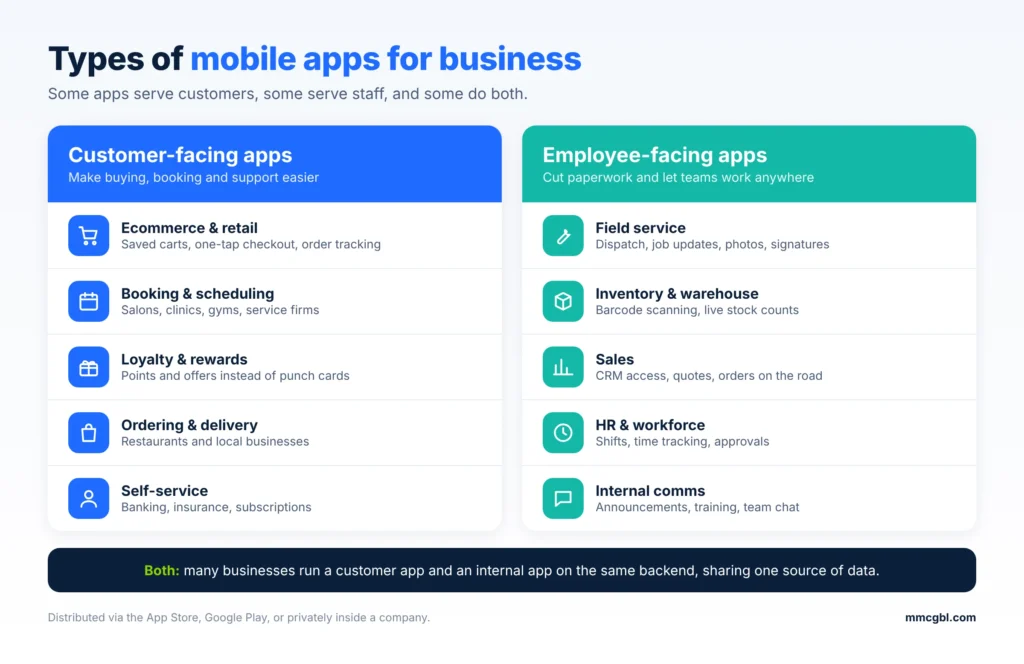
A mobile app for business is software built for smartphones and tablets that helps a company sell, serve customers or run its operations. Some apps face customers, some are used only by staff, and some do both. They can be downloaded from the App Store or Google Play, or distributed privately inside a company.
Customer-Facing Business Apps
These apps are built for the people who buy from you. Their job is to make buying, booking, ordering or getting support easier than it is on a website or over the phone.
Common examples:
- Ecommerce and retail apps with saved carts, one-tap checkout and order tracking
- Booking and scheduling apps for salons, clinics, gyms and service companies
- Loyalty and rewards apps that replace punch cards and drive repeat purchases (see our guide to building a customer loyalty app)
- Ordering and delivery apps for restaurants and local businesses
- Self-service apps for banking, insurance and subscriptions, where customers manage accounts without calling support
Employee-Facing Business Apps
These apps are used inside the company. They cut paperwork, speed up communication and let teams work from anywhere.
Common examples:
- Field service apps for dispatch, job updates, photos and digital signatures
- Inventory and warehouse apps with barcode scanning and real-time stock counts
- Sales apps that give reps CRM access, quotes and order entry on the road
- HR and workforce apps for shift scheduling, time tracking and approvals
- Internal communication apps for announcements, training and team chat
For more ideas, see these business apps that speed up operations, or learn about enterprise app development.
Off-the-Shelf vs. Custom Business Apps
You can either use an existing app built for general business needs, or build one around your own processes. Most companies end up with a mix of both.
| Off-the-shelf apps | Custom business apps | |
| Examples | Slack, QuickBooks, Square, Asana | A branded customer app, a custom field-service tool |
| Upfront cost | Low, usually a monthly subscription | Higher, because you pay for design and development |
| Time to start | Same day | Weeks to months |
| Fit with your workflow | You adapt to the app | The app is built around you |
| Branding | Limited or none | Fully your own |
| Integrations | Only what the vendor supports | Connects to your CRM, ERP and other systems |
| Data ownership | Held on the vendor’s platform | You control the data and the roadmap |
| Best for | Standard tasks like payments, chat and accounting | Customer experiences or processes that set you apart |
A common approach is to start with off-the-shelf tools for standard needs and build a custom app only where an existing product can’t do the job. We cover how to make that decision further down this guide.
10 Benefits of Mobile Apps for Business
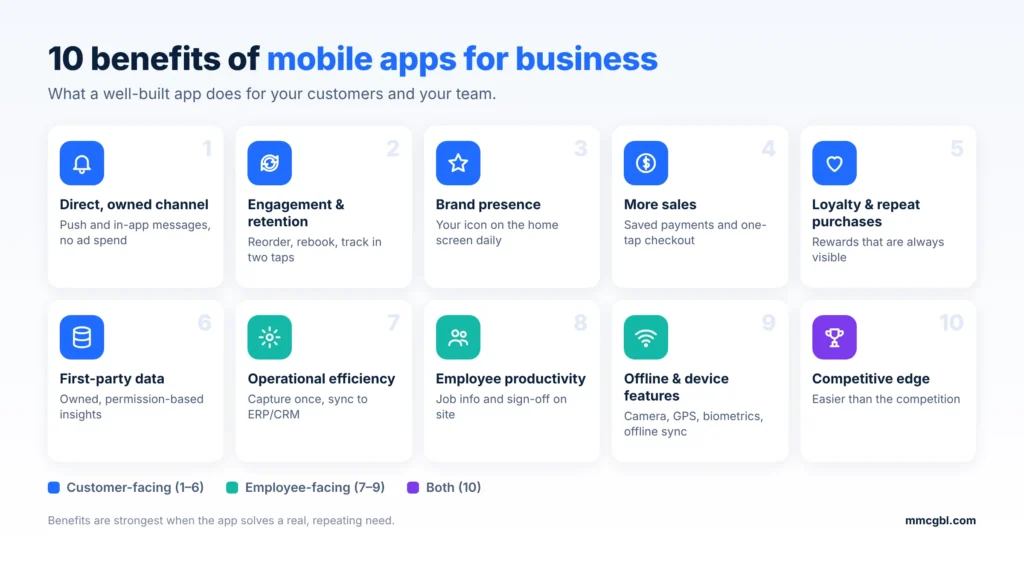
The benefits below apply to most businesses. Some matter more for customer-facing apps (1 to 6), others for employee-facing apps (7 to 9).
1. A Direct, Owned Channel to Your Customers
On social media and search, you depend on algorithms you don’t control. An app puts your brand on the customer’s home screen and lets you reach them through push notifications, in-app messages and offers, with no ad spend per message. Industry benchmarks, mostly from marketing platforms, put push notification open rates at 45-65%, against 18-22% for email. Treat these as directional, because results vary by industry and how often you send. Overuse backfires: sending even one push notification a week can push about 6% of users to uninstall an app.
2. Higher Customer Engagement and Retention
An app lets customers do the things they do most often in a couple of taps: reorder, rebook, check an order, message support. That convenience brings people back. App users often buy more frequently than non-app users, and 60% of first-time app buyers make at least one more purchase. The app still has to earn its place. Average app retention is low, so the engagement benefit goes to apps that solve a repeat need, not ones that only repeat your website.
3. Stronger Brand Presence
Your icon stays on the phone between purchases. That matters in a crowded field: the average user opens about 10 apps a day out of roughly 34 used each month, so earning one of those slots keeps you in front of customers without paying for attention each time. The app also controls the whole experience, with your design, your tone and no competing ads or third-party branding next to your products.
4. More Sales and Higher Conversions
Mobile traffic is high but converts poorly. Shopping apps usually convert better than mobile websites. The gap comes from friction: saved payment details, one-tap checkout, no repeated logins. App shoppers also browse more, viewing 286% more products per session in one Criteo comparison. Your own numbers will differ. Compare your current mobile web conversion rate before assuming an app will close the gap.
5. Better Customer Loyalty and Repeat Purchases
Loyalty programs work better in an app than on a plastic card or in an email. Points, tiers and rewards are always visible and update instantly. An EY study found over 80% of customers are willing to download a loyalty app, and 41% use one once or twice a week. Be careful with the claims you make.
Customers who redeem rewards spend roughly 23-31% more per order, but some of that is because bigger spenders join loyalty programs in the first place. Controlled studies point to a smaller incremental lift, around 7-12%. That is still a worthwhile return for most retailers.
6. First-Party Data and Personalization
With an app, you learn what your customers actually do: what they browse, buy, abandon, and when they’re most active. It’s data you own, collected with their permission, and it doesn’t depend on third-party cookies. You can use it to send relevant offers, recommend products and spot churn early. Generic blasts get ignored. Messages based on real behavior don’t. Collect only what you need, explain why, and follow US state privacy laws such as the CCPA.
7. Greater Operational Efficiency
Apps remove the steps between a task and its record: no paper forms, no re-keying, no waiting for an update by phone. Orders, approvals, inspections, deliveries and payments can be captured once, on the spot, and sync with your back-office systems. This is where custom apps pay off most, because they can follow your exact process and connect to your ERP, CRM or accounting software. The result is fewer errors, faster billing and less time spent on admin.
8. Improved Employee Productivity
Field and frontline teams gain the most. A technician with an app can see job details, equipment history and parts availability on-site. Mobile tools help field teams finish more jobs and fix problems on the first visit, and 20% faster resolution, and best-in-class first-visit resolution runs around 88%, against roughly 68-72% for paper or hybrid teams.
These figures come from vendors, so treat them as ranges to test, not promises. The direction is consistent: when staff have the right information in hand, they spend less time on calls and return visits.
9. Offline Access and Device Features
A mobile site needs a connection and has limited access to the phone itself. An app can work offline and sync later, which matters in warehouses, basements, rural areas and job sites. It can also use the camera for scanning, document capture and proof of delivery, GPS for routing and geofencing, and biometrics like Face ID for secure login. These features open up use cases a website can’t match, such as barcode inventory checks, signed work orders and location-based offers.
10. A Competitive Edge in Your Niche
In many industries, few businesses have a well-built app, so a good one is a visible differentiator. Customers notice when booking, tracking or reordering is easier with one brand than another. In B2B, a client portal app can make you harder to replace, because your customers’ workflows and data end up built around it. The edge fades as competitors catch up, so the apps that last keep improving through updates, new features and real user feedback.
We help businesses plan, design and build mobile apps that keep customers coming back, from loyalty and ordering apps to internal field tools.
Talk to Our App TeamBenefits of Mobile Apps for Business by Industry
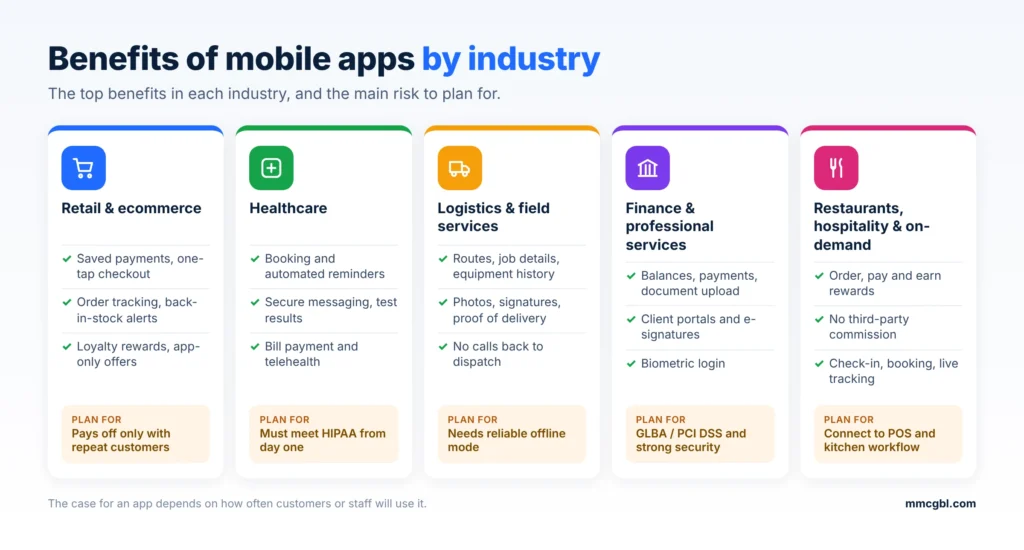
The case for an app depends on the business. The strongest benefits in each industry are below, with the main risk to plan for.
Retail and Ecommerce
Retail has the clearest case for an app, because mobile now carries most shopping traffic but loses a lot of it at checkout. An app fixes the friction with saved payment details, order tracking, wish lists and back-in-stock alerts. It also gives you a home for loyalty rewards and app-only offers. Retail apps work best for brands with repeat customers, and less well for one-off purchases. See our ecommerce app development services.
Healthcare
Patients want to handle healthcare the way they handle everything else: on their phones. An app can combine scheduling, reminders, secure messaging, test results, bill payment and telehealth in one place. Automated reminders are one of the easiest ways to cut missed appointments. The key requirement is compliance: any app handling patient data must meet HIPAA, including secure storage, access controls and audit logs. Plan for it from the start, not as a later fix. Learn more about healthcare app development.
Logistics and Field Services
For businesses with drivers, technicians and crews, an app replaces paper job sheets and phone calls to dispatch. Workers get routes, job details, equipment history and customer notes on the spot, and they can capture photos, signatures and proof of delivery without returning to the office.
Vendor estimates suggest eliminating dispatch calls can save 15-20 minutes per job, and real-time job completion can shorten billing and payment collection. Treat those as vendor figures to verify against your own numbers.
Offline mode is the feature that matters most: crews work in basements, rural areas and warehouses with weak signal, so an app that needs a constant connection won’t get used.
Example: MMC Global built BlueClerk, a field service management platform for US residential contractors, across web, iOS and Android. It started as a mobile tool for technicians to scan tags, record work and produce service reports, and grew into one system for jobs, estimates, invoices, scheduling and the whole crew, with every job tied to the property’s service history. See also our logistics app development services.
Finance and Professional Services
Finance customers now expect a mobile app. In the American Bankers Association’s 2026 survey with Morning Consult, 44% of bank customers named mobile apps as their top way to manage their accounts, up from 26% in 2017. For banks, credit unions, lenders, insurers and wealth firms, an app with balances, payments, document upload, secure messaging and biometric login is now the baseline, not a differentiator.
The bigger opportunity is with business customers and professional services. Accountants, law firms and consultants can use a client app to share documents, collect e-signatures, send status updates and take payments. Security comes first: use strong authentication and encryption, and check the regulations that apply to your sector, such as GLBA or PCI DSS. Explore fintech app development.
Restaurants, Hospitality and On-Demand Services
A restaurant’s own app lets guests order, pay and earn rewards without a third-party delivery platform taking a commission, the Ipsos 2026 study found 74% of quick-service customers have used a restaurant app to order ahead.
Hotels, cafes and bars get similar gains from mobile check-in, table booking, digital keys and loyalty programs. The weak point is the kitchen, not the software: Orders that aren’t ready on time are a common complaint. Connect the app to your POS and kitchen workflow, or a smooth ordering experience will be spoiled at pickup.
Examples from our work: Line It Up brings nearby-store discovery, ordering, pickup, delivery and a live “line skipper” service into one iOS and Android app, with live map tracking. Maid 360 lets customers book residential or commercial cleaning, pay, manage subscriptions and follow live maid tracking, while a separate employee flow helps field staff manage their tasks.
How Much Does a Business Mobile App Cost in the US?
There’s no single price. Your number depends on what the app does, who builds it and how you run it after launch. As a starting point:
| App complexity | Typical cost (USD) | Typical timeline | Examples |
| Simple app / MVP | $10,000 – $50,000 | 2–4 months | Internal tool, single-feature app, booking or catalog app |
| Moderately complex | $50,000 – $100,000 | 4–7 months | Customer app with accounts, payments, push notifications, admin panel |
| Highly complex | $100,000 – $150,000+ | 7–12+ months | Marketplace, real-time tracking, multi-role platform, AI features |
Regulated or enterprise apps (healthcare, banking, large ERP-connected systems) can cost more because of security, compliance and integration work. These are planning ranges, not quotes. For a full breakdown, see our guide to mobile app development cost in the USA.
What Affects the Cost
Complexity and features. This is the biggest factor. A single-purpose app with a few screens costs far less than one with user accounts, payments, real-time tracking or AI features. The gap comes down to screen count, backend depth and whether the app needs real-time features.
Platforms. Building separate native apps for iOS and Android costs more than building one app that runs on both. Cross-platform frameworks can cut dual-platform builds by 30-50%. Flutter and React Native are the common options, (compare them in our Flutter vs React Native guide).
Design. A clean template-style interface costs less than custom UX research, branding and animation.
Integrations. Connecting the app to your CRM, ERP, POS, payment processor or booking system takes development time. This is often where budgets grow.
Backend and infrastructure. Most business apps need servers, databases, an admin dashboard and an API. These are invisible to users but are a large share of the work.
Security and compliance. Healthcare apps need HIPAA, payment apps need PCI DSS, and finance apps may need extra audits. Compliance adds both build time and testing.
Team and location. US developer rates run from about $50 to $150+ an hour. Offshore and nearshore teams can reduce costs by 30-60%, but time zones, communication and quality control need extra attention. Our guide to outsourcing mobile app development covers the trade-offs.
Maintenance. Launch is not the finish line. One estimate says a $100,000 app typically costs $185,000-$195,000 over three years once maintenance, hosting and store fees are included. Budget for updates, bug fixes, OS compatibility, security patches and hosting every year.
Ways to Keep the First Build Affordable
- Start with an MVP: one core workflow, not every feature on your wish list.
- Use cross-platform development unless you have a specific reason to go native.
- Reuse existing services, such as payment providers, authentication and maps, instead of building them from scratch.
- Ask your developer to phase the roadmap, so you can fund version 2 after you see how users respond.
Can you spend less? Off-the-shelf business apps and no-code or low-code builders cost much less and can cover standard needs. They are limited in design, integrations and data ownership, as the next section explains.
Share your features, platforms and goals. We’ll send a clear scope, timeline and cost estimate, usually within 3–6 hours.
Request an EstimateOff-the-Shelf Business Apps vs. Building a Custom App
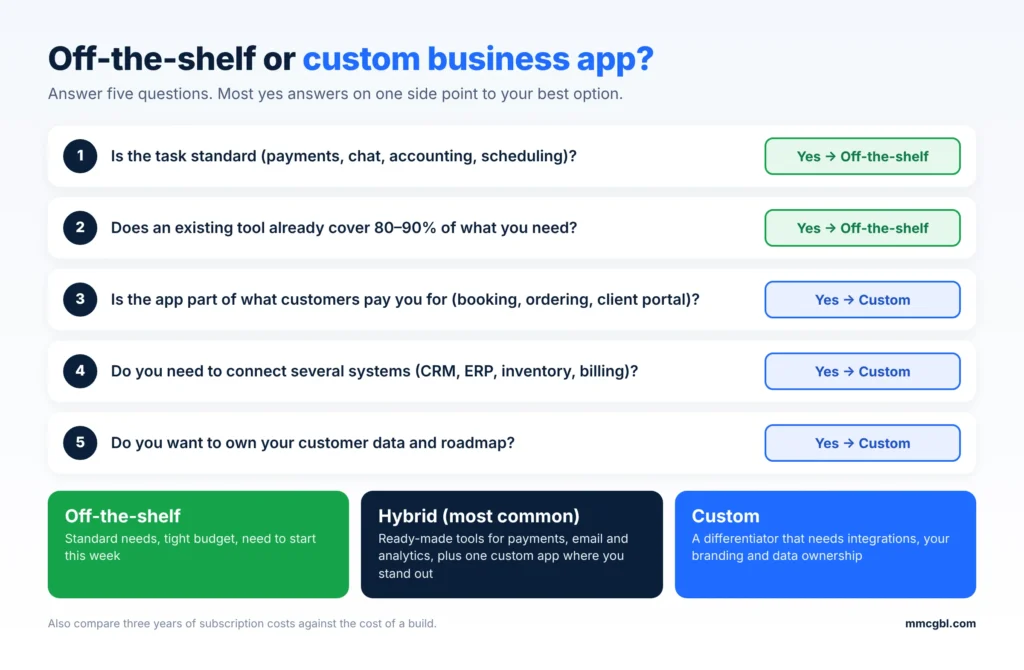
You can use ready-made apps, build your own, or combine the two. The earlier comparison table covers the basics. This section is about how to choose.
Choose off-the-shelf when:
- The task is standard: payments, accounting, team chat, scheduling or email marketing.
- You need to start this week, not this quarter.
- Your budget is small and your process is simple.
- A tool already covers 80-90% of what you need.
Choose custom when:
- The app is part of what customers pay you for, such as booking, ordering or a client portal. A generic tool would look like everyone else’s.
- Your workflow doesn’t fit existing tools, and you’re losing time to workarounds.
- You need to connect several systems (CRM, ERP, inventory, billing) into one experience.
- You want to own your customer data and roadmap, not depend on a vendor’s pricing or feature changes.
- Subscription costs for many users or locations would eventually exceed the cost of building your own.
The hybrid approach. Most businesses don’t pick one. A common setup is off-the-shelf tools for payments, email and analytics, plus a custom app for the customer-facing experience or the one internal process that sets you apart. This keeps the build small and the budget focused.
Questions to ask before deciding
- Will this app be a competitive advantage, or just a utility?
- Do any existing tools cover most of what we need?
- How much will subscriptions cost over three years, compared with a build?
- Who owns the data, and can we export it if we leave?
- Do we need custom integrations or branding that off-the-shelf tools can’t offer?
If most answers point to “standard need, tight budget, speed matters,” start off-the-shelf. If they point to “differentiator, integrations, data ownership,” talk to a mobile app development company about a custom build.
How to Get Started With a Business Mobile App
A good project starts with a clear problem, not a feature list. These steps work for most businesses. For the full picture, see our guide to the mobile app development process.
1. Define the goal and the user
Write down the problem the app solves, who will use it and how you’ll measure success. “Increase repeat orders by 15%” or “cut paperwork time for field staff in half” is a better starting point than “we need an app.”
2. Check that an app is the right answer
Review your options honestly: an off-the-shelf tool, a mobile-friendly website or a progressive web app might do the job for less. Build an app when you need things only an app delivers, such as push notifications, offline access, device features or daily-use convenience.
3. Prioritize features for a first version
List everything you want, then keep only what’s needed to solve the core problem. A focused first release costs less, launches sooner and gives you real user feedback before you invest more.
4. Choose your platform and technology
Decide whether to launch on iOS, Android or both, and whether to go native or cross-platform. Your audience decides this. Check which devices your customers or staff actually use.
5. Pick a development partner
Look for relevant experience in your industry, a clear process, references you can contact and straight answers about cost and timeline. Ask about maintenance and support after launch, not just the build. Our guide on how to choose a mobile app development company covers what to compare.
6. Design, build and test
Expect a sequence of discovery, UX design, development, testing and store submission. Test with real users before launch, and plan time for Apple and Google review.
7. Launch, measure and improve
Track downloads, activation, retention and the metric tied to your original goal (our guide to mobile app KPIs explains what to track). Then update regularly based on what users do. Most successful apps improve in small steps over many releases.
Common Mistakes to Avoid
Building without a clear purpose. An app that only mirrors your website gives people no reason to download it. Early data shows how easy it is to lose users: average retention falls from about 25% on day one to roughly 4% by day 30. The app needs to solve a real, repeating need.
Trying to launch with every feature. Large first releases take longer, cost more and often include features nobody uses. Start with the essentials and expand from user data.
Skipping user research and testing. What your team finds obvious may confuse customers. Talk to real users before you design, and test prototypes before you build.
Ignoring the post-launch budget. Apps need updates, bug fixes, security patches, hosting and OS compatibility work every year. Plan for this from the start so the app doesn’t age badly.
Forgetting about marketing and adoption. A good app doesn’t promote itself. Plan how you’ll get people to download it: in-store prompts, email, QR codes, incentives, staff training for internal apps.
Overlooking security and compliance. If the app handles payments, health data or personal information, build in encryption, secure authentication and privacy compliance (HIPAA, PCI DSS, CCPA where relevant) from the start. Adding them later costs more. Read more about mobile app security.
Choosing a partner on price alone. The cheapest quote often leaves out design, testing or maintenance, and costs more to fix later. Compare scope, process and references, not just the number.
Not defining success metrics. Without targets for retention, conversion or time saved, you can’t tell whether the app is working. Set the metrics before you build.
Conclusion
Mobile apps can help a business in ways a website or social page can’t: a direct line to customers, higher engagement and repeat purchases, first-party data, and smoother work for staff in the field. The benefits are strongest when the app does one useful thing well, whether that is ordering, booking, loyalty rewards, field service or client self-service.
That doesn’t mean every business needs a custom app. Off-the-shelf tools handle standard needs for much less, and a mobile-friendly site may be enough for simple ones. Build when the app is central to your customer experience or your operations, and begin with a focused first version so you can learn what users actually want before you scale.
From MVP to full launch on iOS and Android, our team designs, builds and supports apps that grow with your business.
Explore Mobile App DevelopmentFAQs About Mobile Apps for Business
Are mobile apps worth it for small businesses?
They can be, but only when the app solves a repeat need, such as booking, ordering, loyalty rewards or customer self-service. A small business with regular customers and a clear use case often sees a return. If customers rarely come back, or a mobile-friendly website already does the job, an app may not pay off. Start by testing the idea with off-the-shelf tools or a focused first version before investing in a full custom build.
What are the best mobile apps for business?
The best apps depend on the job. Common picks by category:
- Communication: Slack, Zoom, Microsoft Teams
- Payments and accounting: Square, QuickBooks, Stripe
- Project management: Asana, Trello, Monday.com
- Customer management: HubSpot, Salesforce
- Documents and storage: Google Workspace, Dropbox, Microsoft 365
Choose by the problem you’re solving, check that the app integrates with the tools you already use, and compare pricing for your team size. When no existing app fits your process, that is the point to consider a custom app.
How much does it cost to build a business app?
A simple app or MVP usually costs $10,000–$50,000. A moderately complex app with integrations, payments or user accounts runs $50,000–$100,000. A highly complex app costs $100,000–$150,000 or more, and regulated or enterprise apps can cost more than that. Also budget for yearly maintenance. See our mobile app development cost guide for a full breakdown.
Do I need an iOS app, an Android app, or both?
In the US, the split is close: about 52% of mobile users are on iOS and 48% on Android (StatCounter, October 2026). Check your own website analytics to see which devices your customers use. If you need both, a cross-platform build with Flutter or React Native covers iOS and Android from one codebase and keeps costs down.
How long does it take to build a business app?
A simple app takes about 2–4 months, a moderately complex app 4–7 months, and a complex app 7–12 months or more. The timeline depends on features, integrations, testing and app store review. Our mobile app development process guide breaks down each stage.