Let’s be honest, sending and receiving money should be quick and easy. That’s why apps like Venmo are so popular today.
If you’re looking for the best apps like Venmo in 2025, you’re in the right place. In this blog, we’ll show you the top 10 Venmo alternatives to try this year. And if you’re planning to build your own payment app, our mobile app development company can help bring your idea to life.
Thanks to modern technology, almost everything is just a tap away. You can now order food, book a doctor’s appointment, take yoga classes, or even learn a new language all from your phone.
Payment apps are part of this change. They make life easier by helping people send money, split bills, or get paid without any stress.
With Venmo, you don’t have to worry about who owes what after dinner with friends. Just open the app and transfer money in seconds.
It’s easy to see why people love Venmo. It’s fast, simple, and supports bank transfers, debit cards, and credit cards.
And guess what? The future of payments is going mobile. Experts say tap-to-pay usage will grow 150% by 2028.
In fact, the digital payments market is expected to grow from $4 trillion in 2020 to over $10 trillion by 2026. In the U.S. alone, it’s expected to jump from $450 billion to more than $607 billion.
This shows that mobile money apps aren’t just a trend—they’re the future of how we pay, save, and manage money.
Top 10 Venmo-Like Apps to Try in 2025
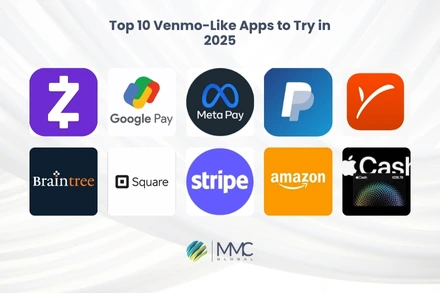
Trending 10 Payment Apps Like Venmo in 2025
Before we explore the best apps like Venmo, let’s first understand what Venmo is and why so many people use it every day.
What is Venmo?

Venmo is a mobile app that makes sending and receiving money super easy. You can pay friends, split a restaurant bill, or send rent all right from your phone.
It’s popular because it’s quick, simple, and even a little fun. Venmo has a social feed where you can see payments between friends (don’t worry you can keep it private too).
You can connect your bank account, debit card, or credit card. And if you want to shop, you can even use the Venmo debit card to buy things or take out cash at ATMs.
Businesses can also use Venmo to accept payments, making it more than just a personal finance tool.
Just a heads-up if you don’t adjust your privacy settings, others might see your payment activity on the feed. So it’s important to stay aware of that.
Key Features
- Super easy to use for sending or receiving money
- Works with your bank, debit card, or credit card
- Social feed to view or share payment activity
- Venmo debit card for shopping or ATM use
- Business profiles for companies to accept payments
Pros and Cons of Using Venmo
| Pros | Cons |
| Easy to use and popular | Public feed can affect privacy |
| Free for standard transfers | Charges for instant transfer or credit cards |
| Fast payments to friends and family | Doesn’t support international transfers |
| Connects with many bank accounts | Risk of fraud if account isn’t protected |
App Rating: 4.⅕
Read More: Discover our trending blog on “Best Apps Like Tinder”
1. Zelle
Zelle is one of the fastest ways to send and receive money in the U.S. It’s a trusted app that’s built into many popular banking apps, which makes money transfers feel like second nature.
There are no extra fees when sending or receiving money through Zelle. If your bank supports it, you can send money instantly using the bank’s mobile app. And if your bank doesn’t support Zelle yet, you can download the Zelle app separately but keep in mind it may have transfer limits.
Zelle is a great option for users who want to send money safely and quickly without needing to share private bank details.
Key Features
- Instant money transfers within the U.S.
- Built into most banking apps
- No fees for sending or receiving money
- Focuses on secure, encrypted transactions
- Simple interface to pay friends and family
Pros & Cons
| Pros | Cons |
| Fast and easy payments | Daily limits set by your bank |
| No transaction fees | Not available for international payments |
| Secure and private | Limited use if your bank isn’t partnered |
| Works with most U.S. banks |
Rating: 4.0/5
2. PayPal
PayPal is a well-known digital wallet used around the world. It allows you to send, receive, and manage money online. With PayPal, you can link your bank, debit card, or even hold funds in your PayPal balance.
It’s especially useful for online shopping, freelancing, or sending money abroad. PayPal offers buyer and seller protection, which gives peace of mind when handling payments.
Key Features
- International money transfers
- Link with bank accounts or cards
- Buyer and seller protection
- Easy online payments and subscriptions
- Mobile app for on-the-go money management
Pros & Cons
| Pros | Cons |
| Used worldwide | Fees for international or instant transfers |
| Great for online payments | Account freezes can happen unexpectedly |
| Secure and encrypted transactions | Higher fees for business use |
| Works with many websites |
Rating: 4.⅗
Discover our popular blog on “Apps similar to TikTok / Best TikTok Alternatives.”
3. Meta Pay (with Messenger)
Meta Pay is Facebook’s built-in payment system that works through Messenger. It’s perfect for sending money to your Facebook friends quickly.
No extra apps are needed, just link your debit card or PayPal and you’re ready to send or request money inside the chat.
Key Features
- Send or receive money directly in Messenger
- Link debit cards or PayPal
- No transaction fees
- Easy peer-to-peer transfers with Facebook friends
- Quick setup and easy to use
Pros & Cons
| Pros | Cons |
| Integrated with Messenger | Only works with Facebook/Messenger users |
| No transfer fees | Limited to U.S. accounts |
| Fast and simple interface | Not for business payments |
| Secure and private |
Rating: 3.9/5
Learn more about “Apps like Instacart” with our recent blog post.
4. Payoneer
Payoneer is built for global business. It’s a great option for freelancers, remote teams, and companies that work internationally. You can receive payments in multiple currencies and access your funds through the Payoneer card or local bank transfer.
Key Features
- Cross-border payments in multiple currencies
- Receive payments from global marketplaces
- Prepaid MasterCard available
- Works well for freelancers and businesses
Pros & Cons
| Pros | Cons |
| Excellent for international payments | Fees may apply for currency conversion |
| Supports multiple currencies | Not ideal for everyday personal use |
| Accepted in over 200 countries | Annual card fees |
| Easy integration with freelance sites |
Rating: 4.2/5
5. Braintree

Braintree, owned by PayPal, is designed mainly for businesses that want to accept payments online or through mobile apps. It supports multiple payment methods, including cards, PayPal, and wallets like Apple Pay or Google Pay.
Key Features
- All-in-one payment gateway for businesses
- Accept PayPal, cards, digital wallets
- Developer-friendly APIs
- Secure and scalable solution
Pros & Cons
| Pros | Cons |
| Supports many payment types | Requires technical setup |
| Trusted by major brands | More for businesses than individuals |
| Strong security and fraud tools | Transaction fees apply |
Rating: 4.0/5
Read More: Check out our newest blog on “Apps like Snapchat”
6. Stripe
Stripe is a top pick for developers and businesses looking for a flexible online payment solution. It supports everything from subscriptions to one-time purchases and integrates easily into websites and mobile apps.
Key Features
- Customizable payment options
- Subscription and billing tools
- Supports international currencies
- Advanced security and anti-fraud systems
Pros & Cons
| Pros | Cons |
| Developer-friendly | Not ideal for personal money transfers |
| Great for online businesses | Setup may be complex for beginners |
| Accepts global payments | Transaction fees apply |
| Transparent pricing |
Rating: 4.⅘
Read More: Top 10 Apps Like Dave.
7. Amazon Pay
Amazon Pay lets users pay for things using the payment methods already saved in their Amazon accounts. It’s mostly used for online shopping but can be a quick checkout tool for businesses, too.
Key Features
- Easy checkout using Amazon credentials
- Secure and familiar interface
- Trusted by many online merchants
- Works on desktop and mobile
Pros & Cons
| Pros | Cons |
| Fast checkout for Amazon users | Limited to partnered stores |
| Built-in fraud protection | No personal money transfer features |
| Safe and reliable |
Rating: 4.⅕
Read More: Explore our newest blog on “Apps like Omegle” & get a similar app developed for your business.
8. Apple Cash®
Apple Cash lets iPhone users send, receive, and spend money easily using the Wallet app. It’s super convenient for Apple users and integrates well with Messages and Apple Pay.
Key Features
- Send money in iMessage
- Spend with Apple Pay or transfer to bank
- Uses Face ID/Touch ID for security
- Works only on Apple devices
Pros & Cons
| Pros | Cons |
| Easy for iPhone users | Only works in Apple ecosystem |
| Instant money transfers | Not available on Android or web |
| No fees for standard transfers | Limited to U.S. users |
Rating: 4.2/5
9. Google Pay
Google Pay makes digital payments simple for Android users. You can pay at stores, send money to friends, or shop online all with one app.
Key Features
- Tap-to-pay at stores
- Peer-to-peer transfers
- Works on Android and iOS
- Store loyalty cards and passes
Pros & Cons
| Pros | Cons |
| Works across many devices | Limited support at smaller retailers |
| Quick and secure payments | International features vary by region |
| No transaction fees |
Rating: 4.⅗
Read: Top 15 Apps Like Kik – Top Kik Alternatives.
10. Square (Cash App)

Square’s Cash App is a great peer-to-peer payment tool that lets users send and receive money quickly. You can also invest in stocks or Bitcoin, and even get a Cash Card to spend your balance.
Key Features
- Peer-to-peer money transfers
- Cash Card for spending or ATM use
- Buy Bitcoin or invest in stocks
- Simple app interface
Pros & Cons
| Pros | Cons |
| Easy to use and fast | Fees for instant deposits |
| Extra features like investing | Limited international use |
| Offers a physical Cash Card |
Rating: 4.⅖
Read Blog on Top 10 Apps Like Pinterest– Best Pinterest Alternatives.
Compare the Top Venmo Alternative Apps in 2025
| App Name | Main Features | What Makes It Unique | Platforms | Best For | Pricing |
| Zelle | Instant money transfers, no need for bank details, no fees for most users | Direct bank-to-bank transfers through major U.S. banks | iOS, Android, Web | Fast P2P payments within the U.S. | Free (check with your bank) |
| PayPal | Global transfers, send/receive with email, buyer/seller protection | Trusted worldwide for secure business & personal payments | iOS, Android, Web | Freelancers, online shopping | 2.9% + $0.30 per transaction |
| Meta Pay (Messenger) | Quick payments inside Facebook Messenger, no fees, simple setup | Built into your Messenger chats | iOS, Android, Web | Social payments to friends | Free |
| Payoneer | Global money transfers, multi-currency accounts, payment requests | Ideal for cross-border freelancing and e-commerce | iOS, Android, Web | Global freelancers & sellers | Varies by service/location |
| Braintree | Accepts PayPal, cards, Venmo, strong fraud protection, recurring billing support | Advanced tools for online stores and marketplaces | iOS, Android, Web | Businesses and SaaS platforms | 2.59% + $0.49 per transaction |
| Stripe | Developer-friendly API, real-time analytics, recurring billing, global support | Perfect for custom e-commerce & app integrations | iOS, Android, Web | Startups, tech companies | 2.9% + $0.30 per transaction |
| Amazon Pay | Lets users pay using their Amazon account, secure checkout | Convenient for people already using Amazon | iOS, Android, Web | Online retailers & shoppers | 2.9% + $0.30 per transaction |
| Apple Cash® | Pay via Messages app, connected to Apple Wallet, instant cash out available | Fully integrated into the Apple ecosystem | iOS | iPhone users, casual transfers | Free or 1.5% for instant transfer |
| Google Pay | Tap-to-pay, send money via phone/email, works in stores & online | Linked with your Google account and Android devices | iOS, Android, Web | Android users, daily spending | Free |
| Square | POS systems, payment links, online store builder, QR code payments | All-in-one payment system for small businesses | iOS, Android, Web | Retail, restaurants, services | 2.6% + $0.10 per transaction |
How to Pick the Right Payment App for Your Business
When it comes to finding the best apps like Venmo for your business, it’s not always easy to decide which one fits your needs the best. With so many payment platforms out there, it can get confusing fast. The good news? You don’t need to feel overwhelmed.
By looking at a few important things, you can choose a payment app that works well with your business style and makes handling money smoother and safer. And if you’re also exploring cash advance options, don’t worry we’ve got a list of popular apps like Brigit for that too.
Here are some smart things to keep in mind when picking a payment app for your business:
Transaction Costs
Some apps charge a percentage per sale, while others have flat-rate fees. Think about your average transaction amount so you can pick a platform that won’t eat into your profits.
System Integration
Make sure the payment app works well with your current setup like your online store, cash register (POS), or bookkeeping tools. The easier the connection, the better the experience for both you and your customers.
Security & Fraud Protection
Go with apps that take your data seriously. Look for strong encryption, fraud monitoring, and account protection features so your customer payments stay secure.
Feedback from Other Users
It’s always smart to read reviews and see what other small business owners or freelancers are saying. Apps with a solid track record usually mean fewer surprises down the road.
Customer Support
Good support can save you time and stress. Pick a payment service that offers quick and helpful customer service, especially if you’re processing payments every day.
Also Read: Top 15 Apps Like Airbnb.
Which Venmo Alternative Is Right for You?
Choosing the best Venmo alternative might seem tricky at first, especially with so many options out there. But don’t worry it all comes down to what you need most. Whether it’s for personal use or business, finding the right payment app depends on your goals, habits, and budget.
Here are a few things to think about before making your choice:
Fees and Transfer Limits
Always check how much a platform charges per transaction and if there are any limits on how much you can send or receive. Some apps might look free at first, but small fees can add up quickly especially for businesses or high-volume users.
Security and Privacy Features
Your financial safety matters. Look for apps that use top-level encryption, offer fraud alerts, and follow industry security standards. This way, your personal or business data stays protected with every transfer.
Compatibility and Integration
Make sure the app works smoothly on your phone or device. If you’re running a business, it should also connect easily with your website, POS system, or accounting software. Seamless integration helps save time and avoid errors.
Personal vs. Business Use
Think about how you’ll use the app. Is it just to split bills with friends, or do you need something more powerful for handling client payments? Some platforms offer advanced features like spending reports, tax summaries, or team access great for business users.
Reviews and Customer Service
Before you download anything, check what other users are saying. Apps with strong ratings and responsive support teams tend to be more reliable and less stressful when things go wrong.
Final Thoughts
Choosing the right payment app can make a big difference in how you manage your money. While Venmo is popular, it’s far from the only option out there. Plenty of alternatives might fit your needs even better.
Whether you’re a business owner looking for global payment solutions like Payoneer or XE Money Transfer, a merchant wanting advanced tools like Stripe or Braintree, or just someone who prefers easy-to-use apps like Cash App or Google Pay, there’s something available for you.
Exploring these options can help you find the perfect fit whether it’s for personal use or business. And if you ever need a custom app built to match your unique needs, MMC Global is here to provide expert app development services tailored just for you.
The apps we’ve shared here are a great starting point to discover the best Venmo alternatives out there.
So why wait? Find the right app today and take control of your payments with speed and ease!
Frequently Asked Questions (FAQs)
What are the main differences between Venmo and its alternatives?
Venmo is well-known for its social features and easy-to-use design, making peer-to-peer payments fun and simple. However, other apps like PayPal, Cash App, and Zelle offer their own unique benefits. PayPal supports international money transfers and is widely accepted by merchants. Cash App lets users invest and trade Bitcoin. Zelle allows quick, free transfers directly between bank accounts. Knowing these differences can help you pick the app that fits your needs best.
Are Venmo alternatives safe for sending money?
Yes, most Venmo alternatives take security seriously. Apps like PayPal and Google Pay use strong encryption and fraud detection to protect your transactions. Cash App and Zelle also add layers of protection such as two-factor authentication and real-time monitoring to prevent unauthorized access or transfers.
Can I use Venmo alternatives for international transfers?
Definitely. Many Venmo-like apps support sending money internationally. PayPal is popular worldwide, though fees can vary. Wise (formerly TransferWise) is known for low-cost international transfers with transparent fees. Remitly focuses on affordable remittances and offers multiple ways to send money abroad.
Do Venmo alternatives charge fees?
Fees depend on the app you choose. For example, PayPal charges about 2.9% plus 30 cents per domestic transaction. Cash App charges fees ranging from 0.5% to 1.75% for instant deposits. Zelle, on the other hand, usually doesn’t charge fees for transfers through its partner banks. It’s best to review each app’s fee policy before deciding.
Who is Venmo’s biggest competitor?
Venmo’s top competitors in payment services include Stripe, PayPal, and Authorize.net. Stripe leads with about 38% market share and is popular for its developer-friendly tools. PayPal holds close behind, known for its global reach and security. Authorize.net specializes in secure payment gateways for small and medium businesses. Each competitor offers strong features making them great alternatives to Venmo.