
For many years, growth in businesses used to come with a weird question: how much more technology are they going to need? Companies really had to make massive decisions even before they could put a finger on what demand would actually look like. Requirements never stay the same, so buying more or less at once ends up being a literal zero.
Then came the game changer, cloud computing. It offered businesses more room to deal with that uncertainty. They can access computing resources without having to create everything around physical equipment on their own premises, making cloud computing for business such an important part of technology planning.
But hold on! Having multiple cloud options does not make the decision any easier. You still need to figure out many things. Business cloud computing works best when those choices are made with a clear understanding of the business itself.
And these are the exact factors we are unpacking next in this detailed guide, so let’s get started!
What Is Cloud Computing?
In simple terms, cloud computing means accessing infrastructure resources over the internet instead of keeping them on physical machines at your company. These resources can be servers, storage, databases, networking, and software. A cloud provider handles the underlying hardware and makes those resources available when your firm needs them.
This one idea has now boomed into a huge industry. Statista reveals that the global cloud market is expected to generate a staggering $1.11 trillion in 2026. The strides do not stop there. By 2031, the market volume is predicted to be $2.27 trillion with a CAGR of 15.34%.
The flexibility of cloud computing for companies increases the overall appeal for adoption. The idea is fairly simple. You use the computing resources when you need them and pay according to the service or usage model you choose. The provider handles much of the underlying infrastructure, while you focus on using those resources to run applications or data management.
Get the right cloud setup to improve performance and keep your technology ready for what comes next.
Join A Quick CallTypes Of Cloud Service Models
Cloud services fall into 3 main models: IaaS, PaaS, and SaaS. The simplest trick to tell them apart is by looking at the amount of responsibility that comes under your business and how much the cloud provider takes care of.
Infrastructure As A Service (IaaS)
IaaS offers basic computing resources required by a business without having to own the physical equipment behind those resources. It consists of virtual servers, storage, networking, and computing capacity, which can be provisioned through a cloud provider.
You will still have considerable control here by having the option to choose an OS, configure apps, manage data, and decide how your operations should run. The cloud service provider, meanwhile, takes care of the physical servers and the data center environment supporting them.
IaaS is useful for businesses dealing with custom applications, hosting websites, backing up important data, or handling workloads that require more control than ready-made software can offer. Resources can be increased or reduced as requirements change.
The demand for Infrastructure as a Service is also reflected in the market since this model is expected to increase from $134.45 billion in 2026 to an estimated $1061.67 billion in 2035.
Platform As A Service (PaaS)
PaaS saves the day by taking some of the management work off your development team’s hands. Rather than setting up servers and configuring the underlying operating environment before development, mobile application developers get a ready-to-use platform for building, testing, and deploying apps.
The cloud provider manages elements like the operating system, runtime environment, and supporting infrastructure.
For organizations that create or update software daily, this can minimize the amount of technical preparation needed before starting development.
The PaaS market is also expanding alongside this demand. According to a Yahoo Finance report, PaaS adoption in enterprises has surged to a value of $89.39 billion in 2025 and is moving to hit approximately $335.15 billion by 2033.
Software As A Service (SaaS)
This model is the one we all interact with. Most people don’t even realize it’s cloud computing. For SaaS, you open a browser or an app, sign in, and start using the software. That’s it! There is no need for your business to maintain the servers hosting it or manually manage each update.
Tools that follow the SaaS model include email, CRM, accounting, collaboration, project management, and file storage. It is particularly convenient when you need software that you can access across locations and devices. Moreover, it also follows a subscription-based model, which allows you to add or remove users as your needs change.
Now, talking about adoption, SaaS also makes up a significant part of the cloud market, alongside infrastructure and platform services. The recent study by Mordor Intelligence shares that Software as a Service is valued at approximately $435.41 billion in 2026, which represents an increase of about 17.55% compared to 2025.
The easiest way to look at the 3 is: IaaS provides the core resources to your business, PaaS offers developers a managed place to build software, and SaaS gives you ready-to-use software.
Commonly Used Cloud Deployment Models
So, we have now covered the 3 ways businesses can use cloud services; however, there is another decision that comes into the picture: who owns the cloud environment and who gets to use it?
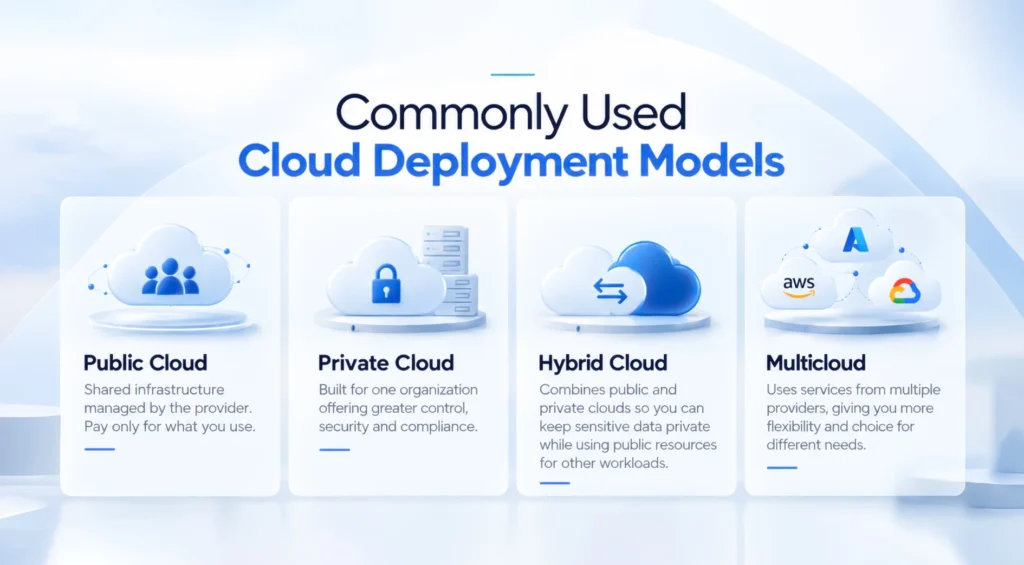
Here we will talk about the deployment models. Public, private, hybrid, and multicloud each offer a different way to organize cloud resources.
Public Cloud
A public cloud is shared by multiple organizations, while the cloud provider handles the underlying infrastructure. Businesses pay for the resources they use without owning or dealing with the physical servers themselves.
The simple access to computing power without the cost of maintaining a data center makes public cloud the common choice for cloud computing for small businesses.
According to market analysis, the global public cloud is expected to hit the value of $1044.2 billion in 2026.
Private Cloud
This one is built mainly for one organization. The resources in the private cloud are not shared with other users. This offers companies firm control over data access and security, especially when stringent compliance requirements or sensitive business data are involved.
Hybrid Cloud
The hybrid cloud deployment model combines the best of both previous models. You can keep your sensitive systems in a private environment while using public resources for other workloads.
This cloud adoption for businesses can help you gradually move older systems to the cloud without moving everything abruptly at once.
Multicloud
Multicloud literally means using cloud services from multiple providers. Let’s say, like, a company may use one provider for application hosting and a different one for data analytics. This approach offers cloud computing for small businesses and enterprises more flexibility when different providers offer different capabilities.
Well, there is also one thing you will have to take care of. Pay close attention to managing costs and security so they do not become difficult to track.
There is no single way to place your business in the cloud. The bigger story is what the setup allows a company to do.
The Practical Benefits Offered By Cloud Computing To Businesses
We have analyzed the way cloud environments can be set up. But what does all of that really mean once you start using them?
It turns out, quite a lot. The benefits show up in multiple things every day. Let’s check them out one by one.
Lower Upfront IT Costs
The huge part of the appeal is simple: you do not have to buy everything before you even use it. Instead of spending heavily on equipment upfront, you can access what you require via cloud services and pay according to your usage. This makes cloud computing for businesses a practical option when emptying your wallet for hardware that does not even make much sense.
Faster Access To Business Resources
Getting your hands on new technology up and running can take time, but with cloud-based services, that wait can be cut much shorter. A team beginning a new project can get access to the apps and computing capacity it requires without waiting for equipment to be purchased, delivered, and installed. The same goes for a growing business that needs to get new employees equipped quickly.
Easier Scaling During Demand Changes
A company can have a very normal Monday and a completely different Tuesday. Customer traffic can hike up, or a seasonal rush can suddenly arrive.
Cloud platforms make it easier to handle such changes without keeping enough physical capacity for the busiest possible day. That flexibility is particularly useful for cloud computing for companies with workloads that rise and fall.
Better Support For Remote Operations
Working across borders becomes much simpler when employees can access the same apps and files via an internet connection.
Offshore software development teams can collaborate across offices, cities, and home workspaces without needing to physically access company systems. This provides cloud services for businesses a natural place in remote and hybrid operations.
Stronger Backup And Disaster Recovery
Cloud platforms can also strengthen the way businesses protect their important records. Data can be backed up across different locations, while recovery services can help restore access after an outage or system failure.
Faster Application Development And Testing
Cloud computing also makes building an application more efficient by providing teams with ready access to environments for building and testing. New features can be tested without setting up special and dedicated physical machines for every single project.
Additionally, teams can create temporary environments when required and remove them once testing is complete.
MMC Global gives your business the freedom to add capacity when demand rises and take off the burden when it goes back to normal.
Talk To Cloud Experts Now!The Cost Of Cloud Computing: What You Should Look Out For
The cost of cloud computing rarely stays tied to one fixed price. The monthly bill can change with computing usage and the services a business keeps active. Even different companies using similar cloud computing solutions can end up with very different bills due to their different usage patterns.
Deloitte’s TMT Predictions also show how common this issue is. The survey found out that half of the organizations had exceeded their cloud budgets in 2023, with the average overrun reaching 15%.
| Cost Factor | What Affects The Bill | Where Costs Can Build |
| Computing | Processing power, instance size, and running time | Idle or oversized instances |
| Storage | Data volume, storage type, and retention period | Old files and backups |
| Data Egress | Data transferred out of the cloud or between locations | Large downloads, migrations, and frequent transfers |
| Software Licenses | Subscriptions, licenses, and premium features | Unused licenses or paid features |
| Database Usage | Database size, queries, and processing capacity | Oversized or constantly running databases |
| Backup And Recovery | Backup volume, retention, and recovery services | Keeping unnecessary backups for too long |
| Support Plans | Support tier and service level | Paying for support beyond actual usage |
| Pricing Model | On-demand, reserved, or usage-based pricing | Higher costs when usage is not planned |
To understand it better, picture a cloud application development team created temporary servers for testing; meanwhile, another team keeps old backups longer than actually planned. A few software subscriptions and frequent data transfers can silently keep adding to the monthly bill.
To keep regular checkups on the spending, businesses often partner with a specialized cloud consulting company to make calculated decisions.
Cloud Security And Governance
Yep, cloud providers handle the security, but that’s not the complete picture. Relying completely on the mindset that cloud platforms cover the 360-degree aspect of security costs businesses with serious concerns.
One thing that often gets overlooked is that organizations are still responsible for keeping data secure by themselves. This shared duty becomes crucial when cloud computing for businesses includes sensitive information, customer records, internal applications, or regulated data.
Identity And Access Management
A cloud account can let users access a wide range of systems and information. IAM helps businesses assign permissions according to a user’s role and responsibility. Multi-factor authentication adds another layer by asking users to verify their identity beyond a password.
Data Encryption And Protection
Data can be easily exposed while it is at rest as well as when it transfers between systems. Encryption protects that information by making it unreadable without the appropriate key.
It also matters to know how those keys are managed. Companies must control who can access them and review those permissions regularly. Backups also require attention, as keeping multiple copies of sensitive records does not help much if those copies are left poorly protected and cloud security best practices are not applied.
Compliance And Regulatory Controls
Security requirements become a bit more specific when a business deals with regulated information. Healthcare records, payment details, and personal data each come with a different set of rules around their access, storage, retention, and auditing.
Compliance requirements become even more important with enterprise cloud solutions where numerous teams may interact with sensitive data across different applications.
Security Monitoring And Threat Detection
Monitoring tools help teams spot suspicious activities, unauthorized access attempts, unexpected permission changes, or abnormal activity, and investigate them beforehand. Logs and alerts also give security teams a record of whatever happened when an issue needs to be investigated.
Application-level risks also deserve the same level of attention. Understanding the challenges of cloud app security gives you further context on the problems that can appear within cloud-based apps.
Policies For Cloud Resource Usage
Security is also influenced by daily choices made by internal teams. Clear internal rules can reduce such uncertainty. They can cover approved services, permission levels, data handling, account management, and how new cloud services must be reviewed before use.
These policies become important during cloud migration for businesses, as teams are often introducing new services and moving existing data at the same time.
Popular Cloud Platforms In 2026
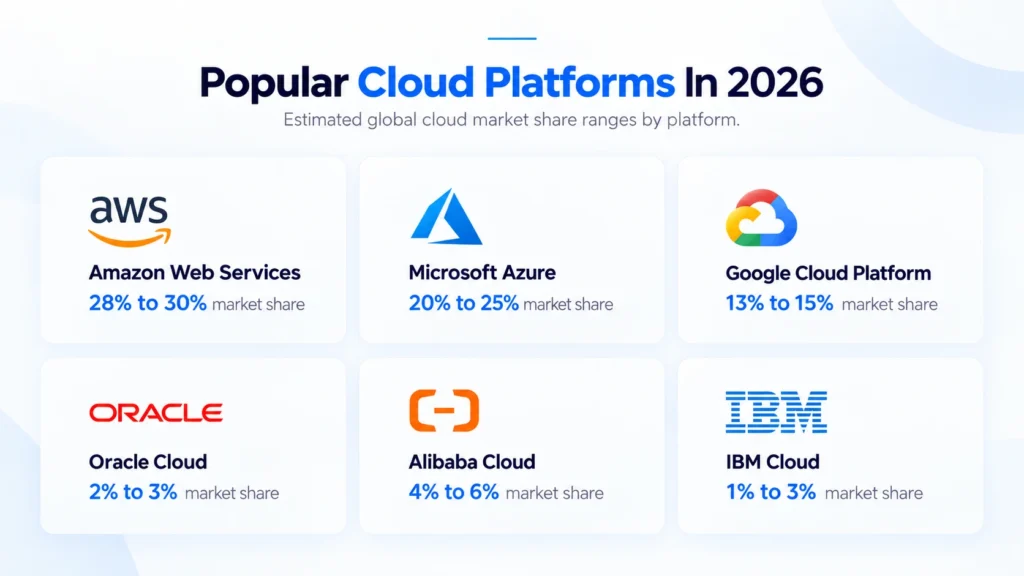
The cloud industry has a few established names that continue to shape the way businesses use cloud technology. AWS, Azure, and Google Cloud rank in the top 3, leading the list as the preferred platforms businesses encounter when selecting cloud options.
- Amazon Web Services: Amazon Web Services provides one of the most diversified selections of AWS cloud services available today. It covers everything from computing and storage to databases, security, and artificial intelligence. It also holds the largest share among global cloud infrastructure in 2026, at about 28%.
- Microsoft Azure: Azure is relatively close to the wider Microsoft services. Microsoft Azure cloud services make it particularly relevant for companies that already rely on tools like Microsoft 365, Windows Server, and other technologies.
- Google Cloud Platform: Google Cloud Platform has a strong position around data and AI. It also supports app development and other core cloud workloads. GCP also holds 14% of the global cloud market in the 1st quarter of 2026.
- Oracle Cloud Infrastructure: Oracle Cloud Infrastructure for businesses has a strong focus on enterprise workloads and database-heavy applications. Moreover, it also supports connections with other major cloud providers, helping organizations running systems across multiple platforms.
- Alibaba Cloud: It has a strong presence across the Asia-Pacific market. Alibaba Cloud’s services cover core computing as well as specialized requirements.
- IBM Cloud: IBM Cloud focuses heavily on enterprise and hybrid cloud use cases. It also places significant emphasis on AI and workloads that operate under strict regulatory requirements.
How To Choose Cloud Solutions For Your Business
Choosing an enterprise cloud solution begins with understanding what the business already has and what it plans to run.
Assess Your Current IT Requirements
Look at the systems your business already uses. Identify where performance is lacking and which apps consume the most resources. This initial step gives you a clearer starting point for cloud computing for businesses. It also prevents you from moving systems just because cloud adoption is becoming common.
Match Workloads To Cloud Services
Different workloads perform better with different cloud services. SMBs can take a similar approach. Cloud computing for small businesses can begin with specific workloads instead of moving every system at once.
Evaluate Security And Compliance Needs
Security needs must be clear before selecting a provider. Analyze how the platform handles access control and data protection. You must also confirm that its services support the regulations that apply to your specific industry.
Compare Pricing And Long-Term Costs
Look beyond the starting price when comparing providers. See the way usage affects computing, storage, egress, software, and support costs. Estimate your expected usage and review how that cost could change as workloads increase.
Consider Integration And Future Needs
Your cloud solution should work with the systems already running across the business. Check if an app can exchange data easily and if existing tools can continue working after migration.
Larger firms may require an enterprise cloud solution that supports multiple teams and complex workloads. It is also worth considering how easily the platform can support new software and services later.
What Does Cloud Adoption For Businesses Involve?
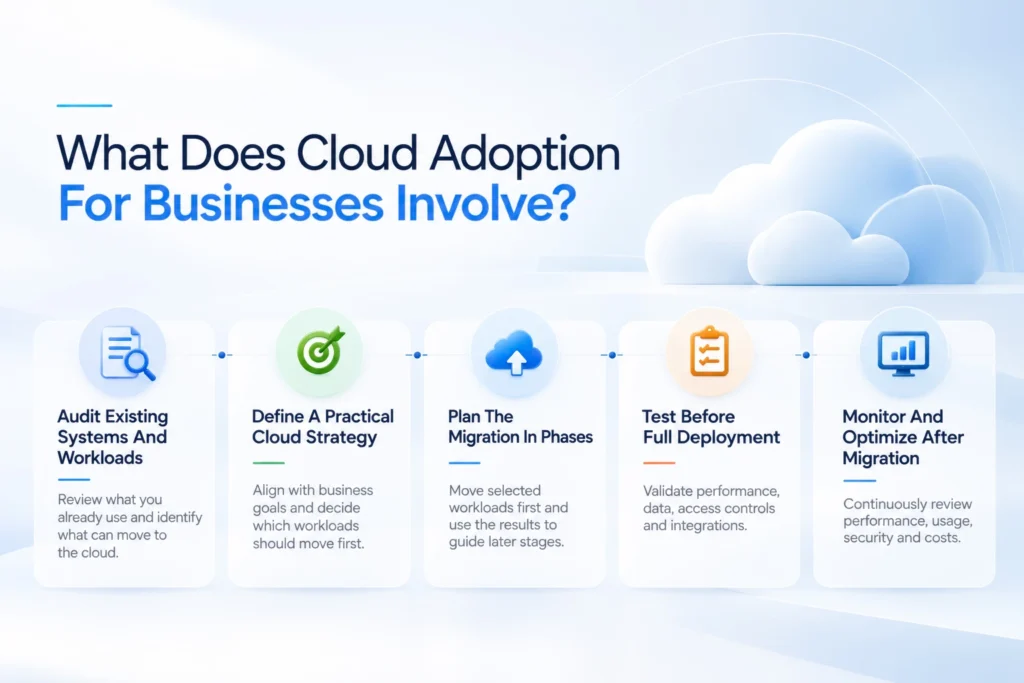
Cloud adoption involves more than moving applications and data to a provider. Businesses have to assess their current systems and decide how each workload will operate after the move.
Audit Existing Systems And Workloads
Start by reviewing the applications, databases, data, and servers already in use. This helps identify what can move as is and what may require changes before migration.
Define A Practical Cloud Strategy
The strategy should connect cloud adoption with actual business priorities. Decide which workloads should move first and what the new setup should achieve.
Cloud computing for businesses becomes easier to manage when security, costs, performance, and responsibilities are defined before migration begins.
Plan The Migration In Phases
Moving everything at once can create unnecessary disruption. A phased approach allows teams to move selected workloads first and use those results to guide later stages.
Test Before Full Deployment
Every migrated workload should be tested before it becomes part of daily operations. Check application performance, data accuracy, access controls, integrations, and recovery procedures.
Monitor And Optimize After Migration
Migration does not mark the end of cloud management. Teams should continue reviewing performance, usage, security, and costs to identify issues that appear after deployment.
Regular monitoring also helps businesses spot inefficient resources, control unnecessary spending, and keep applications performing properly as their cloud usage changes.
When Should You Work With A Cloud Consulting Partner?
A cloud consulting partner can help when internal teams face technical gaps or complex cloud projects. Here are some situations where outside expertise can make the process easier.
Your IT Team Lacks Cloud Expertise
Cloud platforms can be difficult to manage without specialized experience. A consulting partner can help your team select suitable cloud computing services and configure them correctly.
Your Migration Involves Critical Systems
Critical applications require careful migration planning. A consulting partner can assess system dependencies and reduce the risk of disruption during the move.
Cloud Costs Keep Rising
Cloud bills can increase without clear visibility into resource usage. A consultant can review your spending and identify resources that are driving unnecessary costs.
You Need To Modernize Legacy Systems
Older applications may require changes before they can work properly in the cloud. A consulting partner can assess legacy systems and plan the required modernization work.
You Need Ongoing Cloud Management
Cloud computing for businesses requires regular monitoring after migration. Teams can use cloud managed services to monitor performance and security while keeping resource usage and costs under control.
Plan Your Cloud Move With MMC Global
Cloud should never become another expensive item sitting on your IT budget. It should earn its place by making the way your business operates better.
MMC Global brings the technical expertise to make that happen. We work closely with your business to shape a cloud strategy that makes sense for your operations and long-term direction. Our team can support planning, implementation, modernization, and ongoing management without turning the process into a maze of technical decisions.
You get a partner that stays involved beyond the initial move. From improving existing systems to managing day-to-day cloud operations, we help keep your technology aligned with the way your business actually works.
MMC Global helps you find the perfect balance between control and convenience across your cloud services
Consult Our Cloud TeamFrequently Asked Questions
How is cloud computing used in business?
Cloud computing is used in business to host software applications, store operational data, manage databases, and run digital communication tools over the internet. Instead of purchasing physical servers, companies access computing resources on demand to support everyday activities, remote operations, and customer services.
What are the top 3 cloud computing platforms?
The top 3 cloud computing platforms are Amazon Web Services (AWS), Microsoft Azure, and Google Cloud Platform (GCP). Together, these three service providers hold the largest market share globally, offering scalable infrastructure, database systems, and application deployment services for companies of all sizes.
What is the best cloud software for small businesses?
The best cloud software for small businesses includes accessible, subscription-based applications like Google Workspace, Microsoft 365, QuickBooks Online, and Salesforce. These SaaS platforms provide core business capabilities like communication, document sharing, accounting, and customer management without high upfront equipment costs.
How many types of cloud service models are there?
There are three primary types of cloud service models: Infrastructure as a Service (IaaS), Platform as a Service (PaaS), and Software as a Service (SaaS). Each model provides a different level of control, ranging from raw virtual servers and developer toolkits to fully managed online applications.
Does cloud computing reduce IT costs?
Yes, cloud computing reduces IT costs by eliminating the need to purchase, maintain, and power expensive physical servers on-premises. Businesses pay only for the computing capacity they actually consume, replacing large capital investments with predictable, usage-based operating expenses.
Can businesses scale cloud resources?
Yes, businesses can scale cloud resources up or down almost instantly based on current operational demand. Cloud platforms allow companies to add extra server capacity, processing power, or storage during busy periods and downsize when traffic drops back to normal levels.
Does cloud computing support remote work?
Yes, cloud computing supports remote work by allowing employees to access company applications, databases, and files securely from any location with an internet connection. Teams can update project information, communicate, and collaborate across regions without being physically tied to an office network.
Can cloud services improve application performance?
Yes, cloud services improve application performance by distributing workloads across globally managed data centers located closer to end-users. This distributed infrastructure reduces data latency, speeds up application response times, and maintains reliable uptime during sudden user traffic spikes.
Why do companies move workloads to the cloud?
Companies move workloads to the cloud to increase business agility, lower upfront technology expenses, improve data backup options, and deploy new applications faster. Cloud adoption gives growing firms access to modern technology tools without requiring massive internal hardware maintenance.