
Buying high-tier enterprise software is kind of like buying a high-performance sports car. It looks amazing on paper, but if you don’t know how to drive manual, you’re just going to grind the gears and stall in your own driveway.
That is usually what happens when enterprises buy a CRM expecting magic on day one. A standard log-in screen doesn’t fix messy handoffs between sales and marketing, messy contact records, or rigid legacy systems that refuse to talk to each other.
To actually get your money’s worth out of HubSpot at scale, you need a proper plan. You have to connect your data, smooth out broken team processes, build smart automations, and keep the whole machine running without breaking every time your team grows.
This guide is your step-by-step roadmap to doing exactly that. We’ll cover everything from planning to optimizing HubSpot so it actually makes your job easier.
Understanding HubSpot for Enterprise Businesses
HubSpot is mostly popular as a blog tool or an email launcher. For big companies, it’s completely different.
At the middle of it all is the HubSpot smart CRM. It’s a single source of truth for your customer data. Instead of sales using one tool, marketing using another, and support stuck in spreadsheets, everyone looks at the same screen.
That matters when enterprise deals take months and involve ten different decision-makers. HubSpot maps out these complex customer journeys from the first click to the final renewal ticket. When your business grows, the platform scales right along with you without breaking your daily operations.
See where HubSpot fits into complex operations before your teams outgrow disconnected systems and manual processes.
Consult Our ExpertsHubSpot Consulting: Building the Right Enterprise CRM Strategy
Most businesses struggle with HubSpot because they skipped the initial planning phase. Setting up an enterprise portal takes more than default settings if you want it to support complex, everyday operations.
That is why strategy comes first. A strong HubSpot consulting services approach starts by looking at the portal as a whole, identifying what needs to change, and deciding what should be considered or left alone.
HubSpot CRM Consulting
A CRM should reflect how a business operates, not force teams to change their processes just to fit a template.
HubSpot CRM Consulting lets enterprises define the structure behind the portal. It also helps identify where the current setup is creating friction.
That strategic groundwork makes future HubSpot CRM optimization much more meaningful because there is a clear model to improve rather than a collection of disconnected fixes.
HubSpot Marketing Hub Consulting
Enterprise marketing usually has more moving parts than a handful of campaigns. Different markets may target different audiences. Teams may work across regions. Reporting needs to connect activity with revenue rather than just clicks.
HubSpot Marketing Hub Consulting focuses on deciding how marketing should operate inside the wider CRM system.
The strategy can also identify where HubSpot lead nurturing, marketing automation, or HubSpot email marketing should support the customer journey later.
HubSpot Sales Hub Consulting
Sales processes often become complicated long before they become efficient. With HubSpot sales hub consulting, enterprises can figure out multiple processes into a consistent sales model before any build work begins. That means clarifying stages, ownership, routing logic, forecasting requirements, and the information sales teams actually need to act on.
Once the model is defined, capabilities such as HubSpot sales automation, HubSpot sales pipeline management, and HubSpot sales reporting have a clear purpose rather than becoming features added simply because they are available.
HubSpot Service Hub Consulting
Customer service needs its own operating model. A high-volume support team may care about response times and ticket ownership, while another may depend more heavily on self-service and escalation rules.
HubSpot service hub consulting helps identify how those experiences should work across the organization. Those decisions can later shape the use of HubSpot ticketing, HubSpot help desk, and a HubSpot knowledge base without turning the strategy into a list of features.
HubSpot Content Hub Consulting
Enterprise content can become difficult to govern when multiple teams, regions, and business units publish through the same ecosystem.
HubSpot content hub consulting focuses on the operating model behind that content. Who can publish? What needs approval? Which elements should stay consistent across markets? Where should teams have flexibility?
Those decisions create the foundation for broader content operations without jumping ahead into development itself.
HubSpot Data Hub Consulting
Enterprise data strategy is less about having more records and more about knowing which records can be trusted.
HubSpot data hub consulting can help define how customer data should be handled across the organization. That includes decisions around data ownership, transformation rules, synchronization requirements, and quality standards.
HubSpot Revenue Hub Consulting
Revenue operations often expose gaps between teams that otherwise remain hidden. Sales may see the deal while finance sees the payment and operations sees the subscription.
HubSpot revenue hub consulting allows enterprises to decide how those stages should connect and what revenue teams actually need visibility into. The goal is to decide what a connected revenue process should look like before anyone builds it.
How To Implement HubSpot In Enterprises?
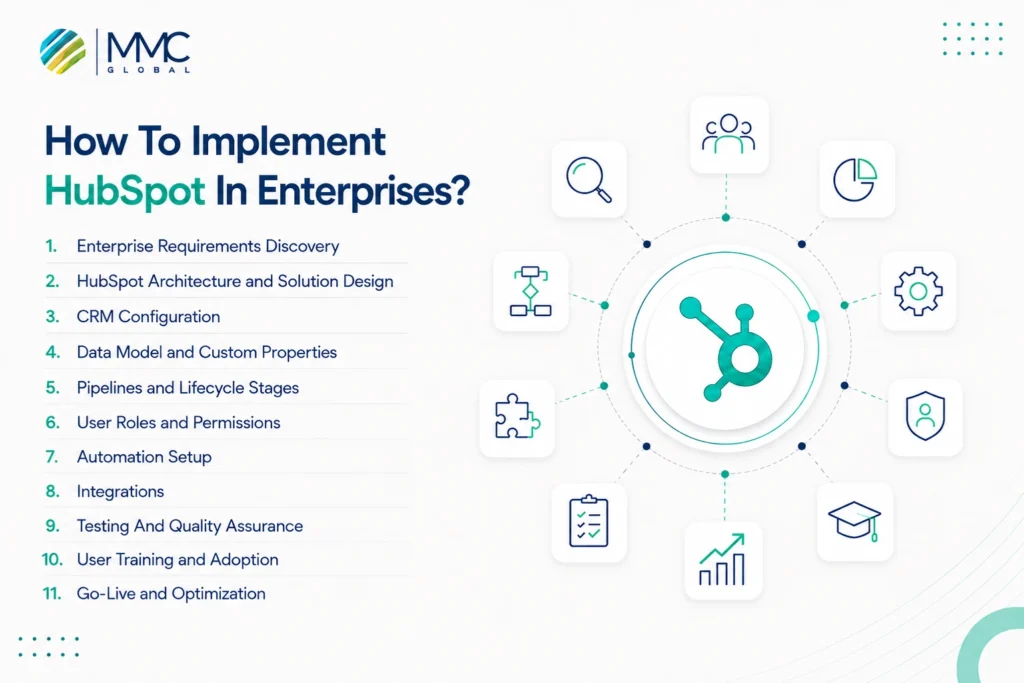
A solid strategy tells you where HubSpot needs to go. Implementation is where that plan becomes a working system.
For enterprise software, that means more than setting up a portal and adding users. Teams have to agree on how the CRM should work, how data should move, what needs automation, and how everything should hold up once people start using it every day.
A structured HubSpot Implementation Services approach keeps those moving parts in sync and gives each stage a clear purpose.
1. Enterprise Requirements Discovery
Start by figuring out what the business actually needs from HubSpot.
Look at current workflows, team responsibilities, customer journeys, reporting requirements, pain points, and the systems already in use. This stage prevents teams from building around assumptions that later create more work.
The goal is simple: understand the business before changing the platform.
2. HubSpot Architecture and Solution Design
Once the requirements are clear, they need to become a practical HubSpot structure.
This means deciding how teams will use the platform, how records will relate to one another, where information should live, and how HubSpot should fit into the wider technology stack.
Good architecture leaves room for growth. Bad architecture usually shows up later as workarounds.
3. CRM Configuration
Now the planned structure starts taking shape inside HubSpot.
This can include configuring the CRM, setting up teams, adjusting settings, creating views, and aligning the portal with the processes defined earlier.
The aim is not to customize every setting available. It is to make the system useful without making it unnecessarily complicated.
4. Data Model and Custom Properties
Enterprises often need more structure than standard fields can provide.
This stage defines which information needs to be captured, how records should relate, and which custom properties are actually worth creating. The focus stays on useful data rather than collecting everything just because the platform allows it.
A cleaner data model also makes reporting and automation easier later.
5. Pipelines and Lifecycle Stages
Next, map the way customers and deals actually move through the business.
That could mean defining lifecycle stages, sales pipelines, deal stages, ownership rules, or handoffs between teams.
The important part is consistency. Everyone should know what each stage means and what should happen before a record moves forward.
6. User Roles and Permissions
Not everyone in an enterprise needs the same level of access.
Set permissions around roles, teams, data, and responsibilities so people can see what they need without exposing everything to everyone.
This also helps protect sensitive information and keeps the portal easier to manage as new teams and users are added.
7. Automation Setup
Once the processes are clear, repetitive work can be automated.
Think lead assignments, notifications, record updates, follow-ups, approvals, and other actions that happen again and again.
The best automation is not the one that does the most. It is the one that removes unnecessary work without creating another problem for the team.
8. Integrations
HubSpot rarely works alone inside an enterprise.
This is where it connects with systems such as ERP platforms, finance tools, other CRMs, e-commerce systems, data warehouses, or internal applications.
The key is making sure information moves between systems reliably. Data mapping, sync rules, ownership, error handling, and security all need to be considered before the connection goes live.
9. Testing And Quality Assurance
Before launch, test the system like a real user would.
Check records, workflows, permissions, integrations, reports, notifications, and edge cases. A workflow that works perfectly in a demo can behave very differently once it encounters real data and real users.
Testing helps catch those issues before they reach the wider organization.
10. User Training and Adoption
A technically sound HubSpot setup can still fail if teams do not know how to use it.
Training should focus on the work people actually do, not just where each button lives. Show teams how the new processes fit into their day, what has changed, and what they are expected to maintain.
That makes adoption much easier than handing everyone a manual and calling it training.
11. Go-Live and Optimization
Once everything checks out, HubSpot can go live in the wider organization.
But implementation does not really end on launch day. Early usage will reveal gaps, confusing workflows, and processes that looked fine during planning but need adjustment in practice.
That is where ongoing HubSpot CRM Optimization becomes useful. The system should keep improving as teams use it, the business changes, and new requirements appear.
HubSpot Integration for Enterprise Systems
Enterprise businesses rarely run on one system. Customer data might sit in HubSpot while finance works in an ERP, sales uses another CRM, and leadership depends on a separate reporting platform. Without proper connections, teams end up moving information between systems by hand.
HubSpot integration services help bring those systems into the same flow so teams can work with consistent data without replacing the tools they already depend on.
Why Do Enterprises Integrate HubSpot?
A connected system saves teams from constantly checking different platforms for the same information.
Integrations can keep customer records aligned, reduce repetitive data entry, connect sales activity with finance and operations, and give decision-makers a clearer view of what is happening across the business. HubSpot data integration can also help keep information moving between systems as teams create, update, or use customer records.
What Can HubSpot Connect With?
The right connections depend on the enterprise’s existing technology stack. HubSpot may need to exchange data with another CRM, an ERP, an e-commerce platform, finance software, a data warehouse, or an internal business application.
For example, a HubSpot Salesforce integration can help synchronize customer and sales information, while a HubSpot Microsoft Dynamics integration can connect HubSpot with an existing Microsoft business environment.
Each integration should solve a clear business need.
How Does Enterprise HubSpot Integration Work?
A typical setup may look like this:
1. HubSpot
2. API / Middleware / iPaaS
3. CRM / ERP / Finance / Data Systems
4. Reporting and Business Intelligence
The middle layer controls how information moves between platforms. Depending on the setup, data may pass through native connectors, middleware, or custom APIs.
When standard connections cannot handle a specific business rule, HubSpot API integration can provide more control over how data is exchanged. For example, an enterprise may need a custom connection between HubSpot and an ERP to keep customer and operational records aligned.
What Should Enterprises Consider Before Integrating HubSpot?
Before integrating HubSpot, enterprises need to decide:
- Which system owns each type of data?
- How do fields map between platforms?
- How often should information sync?
- What happens when a transfer fails?
API limits and security also need attention, especially when sensitive customer or financial information is involved.
A clear integration plan helps prevent one system from becoming another source of duplicate records, conflicting data, or manual work. That is especially important when multiple HubSpot third-party integrations are involved.
Connect HubSpot with the tools your teams already use and keep critical business data moving where it belongs.
Explore Your Integration OptionsHubSpot Migration and Enterprise Data Management
Moving to HubSpot sounds straightforward until you look at everything sitting inside the old CRM. Years of contacts, deal records, custom fields, notes, and activity history can make a migration much harder than a simple export and import.
The real challenge is deciding what should move, how it should be structured, and whether it still belongs in the new system. A well-planned HubSpot migration services approach helps enterprises make that move without carrying years of bad data into a fresh portal.
Salesforce to HubSpot Migration
Salesforce environments can contain complex objects, custom fields, workflows, and years of customer activity. Moving that data to HubSpot requires more than matching one field to another.
Teams need to identify which records matter, preserve important relationships, and account for differences in how the two platforms structure data. The goal is to bring over useful information without rebuilding unnecessary complexity.
Microsoft Dynamics to HubSpot Migration
A Dynamics to HubSpot migration can involve customer records, sales activity, custom entities, and business processes spread across a larger Microsoft environment.
Before moving anything, it helps to separate essential data from information that no longer serves a purpose. That makes the new CRM easier to manage and gives teams a cleaner starting point.
Legacy CRM Migration
Legacy systems often make migration harder because their data structures may be outdated, heavily customized, or poorly documented.
Old fields may no longer have clear owners. Some records may be incomplete. Others may exist in several formats. A careful review of the legacy environment helps identify what should be retained, transformed, archived, or removed before the move.
Data Cleansing
Migration is a good opportunity to clean house.
Duplicate contacts, outdated records, incomplete fields, inconsistent naming, and irrelevant information can all create problems after migration. Cleaning the data beforehand gives teams a more reliable foundation and reduces the amount of maintenance needed later.
Field Mapping
The same information can look very different across platforms.
One CRM might store customer type in a custom field while another uses a different property structure entirely. Field mapping creates a clear relationship between the old and new systems so information lands in the right place.
This also helps identify fields that need to be combined, renamed, transformed, or left behind.
Duplicate Management
Duplicates can multiply quickly during a large migration, especially when records have been created across different systems over several years.
Before importing data, enterprises should establish rules for identifying duplicate contacts, companies, and other records. That makes it easier to decide which record stays, which gets merged, and which should be removed.
Historical Data Migration
Not every old record needs to make the journey.
Some businesses need years of deal and activity history for reporting, customer context, or compliance. Others only need recent information to keep the new CRM manageable.
The decision should be based on how the organization actually uses historical data rather than trying to migrate everything by default.
Enterprise HubSpot Migration Checklist
Before the migration is considered complete, review:
- Data inventory and ownership
- Data cleansing and duplicate removal
- Field mapping
- Custom property mapping
- Record relationships
- Historical data requirements
- Migration testing
- Data validation
- User acceptance testing
- Post-migration checks
A little preparation here can save a lot of cleanup later. The objective is not simply to get the data into HubSpot. It is to make sure the data is usable once it gets there.
HubSpot Automation for Enterprise Operations
Automation becomes much more useful when you stop thinking about it as a collection of clever workflows and start looking at the work people repeat every day.
In an enterprise, that work can span lead management, sales follow-ups, customer support, approvals, and data updates. The right HubSpot automation services can take those predictable tasks off people’s plates while keeping important handoffs moving between teams.
Marketing Automation
Marketing teams spend plenty of time moving leads from one stage to another, sending follow-ups, and managing campaign actions.
HubSpot can handle much of that routine work through HubSpot marketing automation. Lead scoring can help prioritize prospects, while nurturing workflows keep relevant content moving based on where someone is in the customer journey.
The idea is not to automate every interaction. It is to make sure good leads do not sit unnoticed because someone missed a task.
Sales Automation
Sales teams have their own share of repetitive work. New leads need to be assigned, follow-ups need to happen, and deals often require the same actions at predictable points in the pipeline.
HubSpot sales automation can handle those routine steps through lead assignment, reminders, record updates, and deal workflows. Reps can spend less time keeping the CRM updated and more time acting on opportunities that actually need their attention.
Customer Service Automation
Support teams deal with a steady stream of requests, and not every ticket needs the same response.
Automation can route tickets to the right team, trigger SLA workflows, and send customers updates when certain actions occur. It can also reduce delays when requests move between support levels or require input from another department.
The result is a more predictable service process without making every interaction feel automated.
Operations Automation
Some of the most useful automation happens behind the scenes.
Teams can automate data synchronization, routine record updates, internal approvals, and basic data cleanup so employees do not have to keep performing the same administrative tasks manually.
HubSpot Data Automation is particularly useful when information needs to stay consistent across different processes. Done well, automation becomes part of the operating system rather than another workflow for someone to keep checking.
Custom HubSpot Development for Complex Requirements
HubSpot can handle a lot out of the box. But enterprise businesses rarely have perfectly standard processes.
Eventually, you may need a system to behave in a way HubSpot does not support natively. Maybe two internal platforms need a custom connection. Maybe your CRM needs a data structure that standard objects cannot provide. Or perhaps your teams need a tool that lives directly inside the HubSpot workspace.
That is where custom HubSpot development services comes in. Hire HubSpot developers when configuration alone cannot give the business the functionality it actually needs.
Custom Integrations
Standard connectors work well for common use cases. Complex enterprise environments often need something more specific.
Custom integrations can connect HubSpot with internal applications, legacy platforms, or systems that do not have a ready-made connector. They also give teams more control over what data moves, when it moves, and what happens along the way.
Private Apps and HubSpot APIs
Private mobile applications can provide controlled access to HubSpot data and functionality for internal systems and processes.
The HubSpot APIs can also support more tailored solutions when a standard integration cannot handle a particular requirement. This can include moving data between systems, triggering actions, or extending existing workflows.
Custom Objects and CRM Extensions
Standard CRM structures do not always reflect how an enterprise operates.
Custom objects allow businesses to represent information that does not fit neatly into HubSpot’s default records. CRM extensions can then bring additional tools or information into the places where teams already work.
The result is a CRM that better matches the business instead of forcing unusual processes into generic fields.
Custom Workflow Actions
Not every business rule can be handled with standard workflow actions.
Custom workflow actions can extend what automation can do by triggering actions specific to an enterprise’s processes. This is useful when a workflow needs to interact with another application, perform a specialized operation, or follow a rule that HubSpot does not support natively.
UI Extensions
Sometimes the problem is not missing data. It is that users need a better way to work with it.
UI extensions can bring custom information, actions, or tools into HubSpot so teams do not have to keep switching between different systems to complete routine tasks.
Custom Dashboards and CMS Development
Enterprise teams may also need reporting views built around their own metrics, roles, or business units. Custom dashboards can make that information easier to use without forcing every team into the same reporting setup.
On the web side, CMS development can extend HubSpot beyond standard templates and modules, giving larger teams more control over website development, content components, and digital experiences.
Custom development should solve a real limitation, not add complexity for the sake of it. The best solution is usually the smallest one that makes HubSpot work better with the way the business already operates.
Extend HubSpot with the custom tools and functionality your enterprise processes actually require.
Talk To Our ExpertsHubSpot Support and Maintenance for Enterprise Teams
Getting HubSpot live is only the beginning. Enterprise portals keep changing as teams grow, processes shift, integrations evolve, and HubSpot itself introduces new capabilities. Without regular upkeep, yesterday’s clean setup can quickly become tomorrow’s technical debt.
With HubSpot support and maintenance services, enterprises can keep the platform useful long after implementation.
- Keep the CRM in shape: Regular HubSpot optimization services can clean up outdated workflows, improve portal structure, and keep the CRM aligned with changing business needs.
- Fix issues before they spread: From broken automations to reporting errors, ongoing troubleshooting helps prevent small platform issues from turning into team-wide problems.
- Watch connected systems: Integration monitoring can catch failed syncs, missing records, or API issues before they affect downstream processes.
- Maintain workflows: As teams and customer journeys change, existing automations may need to be adjusted rather than left running on old rules.
- Protect data quality: Regular checks help identify duplicates, outdated records, and inconsistencies before they start affecting reporting or decisions.
- Review access regularly: New hires, role changes, and team restructuring can all affect permissions. Regular reviews help keep sensitive information where it belongs.
- Bring in useful updates: New HubSpot features can be valuable, but they still need to fit the existing setup before being rolled out.
- Help teams when they get stuck: Ongoing HubSpot Technical Support and HubSpot CRM Support give users somewhere to turn when something stops working as expected.
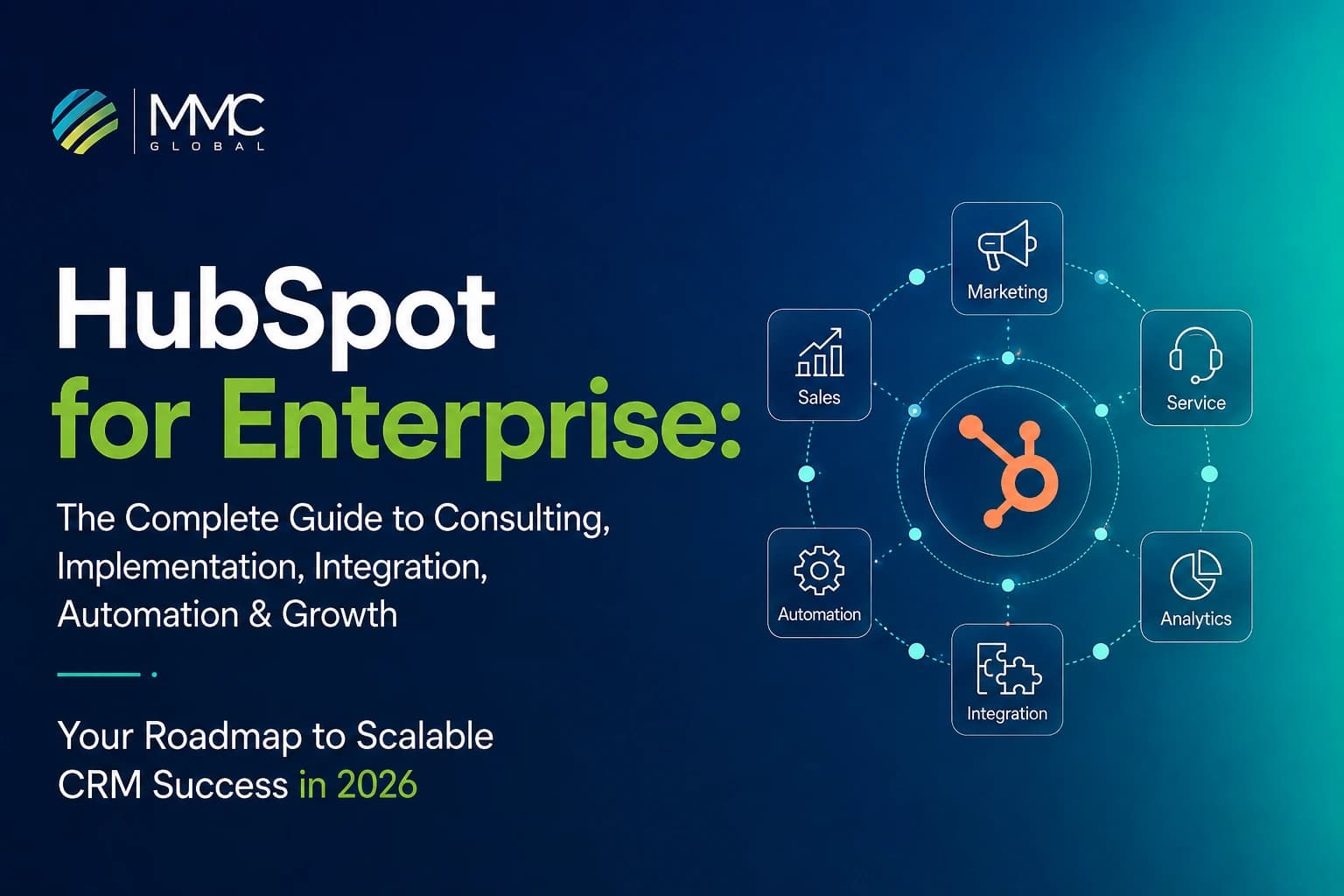
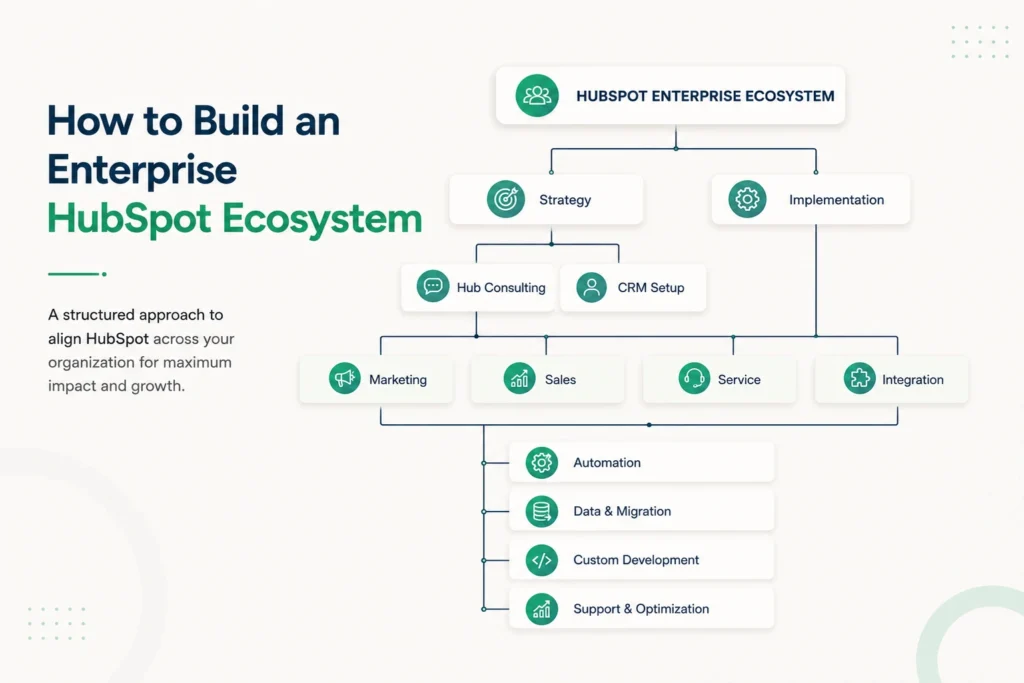
How to Build an Enterprise HubSpot Ecosystem
Enterprise HubSpot is not built in one go. Different teams, systems, and processes come into the picture at different stages. The key is knowing what needs to connect, what needs to stay separate, and what needs attention as the business grows.
The result is a connected environment where customer data, business processes, and technology work together instead of sitting in separate silos.
Common Enterprise HubSpot Challenges
Enterprise HubSpot setups rarely run into problems because the platform cannot do something. More often, the issue is that the setup no longer matches the way the business operates.
Complex CRM Architecture
As teams, processes, and data structures grow, a simple CRM setup can become difficult to manage. Poorly planned objects, properties, and pipelines often create more confusion than clarity.
HubSpot CRM Consulting can help bring the structure back into line with business needs.
Data Silos
Customer information spread across multiple systems makes it harder to get a complete view of the customer.
With HubSpot data integration, enterprises can connect the right systems and reduce the need to move information manually.
Multiple Business Units
Different regions, brands, or teams may have their own processes while still needing shared visibility.
A clear HubSpot strategy can help balance local requirements with centralized control through the right structures, permissions, and reporting.
Poor Data Quality
Duplicate records, outdated information, and inconsistent fields can quietly undermine everything built on top of the CRM.
HubSpot data quality practices help keep the information teams rely on accurate and usable.
Difficult CRM Migrations
Moving years of data from an existing platform is rarely as simple as exporting a file and importing it somewhere else.
HubSpot migration services can help enterprises handle cleansing, mapping, migration, and validation without carrying unnecessary problems into the new CRM.
Integration Failures
A broken sync can quickly turn into missing records, conflicting information, or unreliable reports.
HubSpot integration services can help enterprises build and maintain more dependable connections between HubSpot and the systems around it.
Low User Adoption
Even a well-built CRM can struggle when teams find it difficult to use or do not understand how it fits into their daily work.
Training, clearer processes, and ongoing HubSpot consulting services can help close that gap.
Inefficient Automation
Automation that was useful a year ago may become a burden as processes change. Too many unnecessary workflows can also make the portal harder to manage.
HubSpot automation services can help review what should be automated, simplified, or removed.
Inconsistent Reporting
When teams use different definitions, fields, or reporting methods, leadership can end up looking at several versions of the same story.
A stronger CRM and data structure can bring reporting closer to a shared source of truth.
Scaling Issues
A HubSpot setup that works for one team may start showing cracks when more users, markets, data, and processes are added.
Ongoing HubSpot optimization services can help the platform evolve without forcing the business to rebuild everything from scratch.
How to Choose the Right HubSpot Services for Your Business
Not every enterprise needs the same HubSpot setup. The right starting point depends on where the current gaps are, what the business is trying to change, and how far the existing portal has already been developed.
| Business Challenge | Relevant Service |
| Need a stronger CRM strategy? | HubSpot CRM Consulting |
| Marketing operations need structure? | HubSpot Marketing Hub Consulting |
| Sales processes need improvement? | HubSpot Sales Hub Consulting |
| Customer support needs a better system? | HubSpot Service Hub Consulting |
| Website and content operations need better control? | HubSpot Content Hub Consulting |
| Is customer data difficult to manage? | HubSpot Data Hub Consulting |
| Revenue processes lack visibility? | HubSpot Revenue Hub Consulting |
| Business systems need to work together? | HubSpot Integration Services |
| Moving from another CRM? | HubSpot Migration Services |
| Too much repetitive manual work? | HubSpot Automation Services |
| Setting up HubSpot for the first time? | HubSpot Implementation Services |
| Can standard functionality not meet a requirement? | Hire HubSpot Developers |
| An existing portal needs ongoing help? | HubSpot Support & Maintenance Services |
The point is not to add more HubSpot services than you need. It is to identify the bottleneck first, then address the part of the system causing it.
Enterprise HubSpot Implementation Roadmap
Implementing HubSpot at enterprise scale is an ongoing journey rather than a single launch project. Different workstreams come together at different points, with the focus gradually shifting from planning the platform to making it work for the business long term.
Phase 1 — Strategy And Consulting
Define the business direction, priorities, and expected outcomes.
Phase 2 — Architecture And Planning
Establish the overall HubSpot structure and how it will fit into the existing environment.
Phase 3 — Implementation
Turn the approved plan into a working HubSpot environment.
Phase 4 — Migration
Bring over the relevant data from existing systems and prepare it for the new environment.
Phase 5 — Integration
Connect HubSpot with the platforms and systems the business already relies on.
Phase 6 — Automation
Reduce repetitive work and create smoother movement between teams and processes.
Phase 7 — Custom Development
Extend the platform when standard HubSpot functionality cannot meet a specific requirement.
Phase 8 — Training And Adoption
Help teams understand the new environment and make it part of their everyday work.
Phase 9 — Ongoing Support And Optimization
Keep the platform reliable, relevant, and aligned with changing business needs.
Get More From HubSpot At Enterprise Scale With MMC Global
At enterprise scale, there is little room for systems that almost work. Every workflow has a purpose. Every integration has a role. Every part of the CRM needs to support the way your teams actually operate. That level of precision is what separates a functional HubSpot setup from one that becomes a real business advantage.
For enterprises that expect more from their HubSpot investment, the difference often comes down to who is behind the system. MMC Global brings enterprise technology experience to HubSpot with a focus on the bigger picture. From strategy to complex technical requirements, the work is shaped around your business rather than a standard playbook.
The result is a HubSpot environment built with the scale, flexibility, and control that serious enterprise operations demand.
Go beyond the standard setup with solutions shaped around your enterprise goals and requirements.
Build With MMC GlobalFrequently Asked Questions
Is HubSpot suitable for enterprise businesses?
Yes, HubSpot is fully suitable for enterprise businesses through its Enterprise tiers, which feature custom objects, advanced permissioning, sandbox environments, and high-volume API capacity. These tools allow large organizations to manage complex operations, global teams, and strict data governance smoothly on a single platform.
Which HubSpot hubs are best for enterprise organizations?
The best HubSpot hubs for enterprise organizations are Marketing Hub Enterprise, Sales Hub Enterprise, and Service Hub Enterprise, which form the core engine for revenue teams. Pairing these with Operations Hub and Content Hub ensures unified data orchestration, robust API integration, and scalable CMS management across global business units.
How long does an enterprise HubSpot implementation take?
An enterprise HubSpot implementation typically takes anywhere from 3 to 6 months depending on operational complexity. This timeline accounts for deep requirements discovery, custom data model architecture, system integrations, legacy data migration, rigorous QA testing, and team-wide adoption training.
Can HubSpot integrate with ERP and other enterprise systems?
Yes, HubSpot integrates seamlessly with enterprise ERPs and legacy systems like NetSuite, SAP, Salesforce, and Microsoft Dynamics through native connectors, iPaaS platforms, or custom REST APIs. These connections enable real-time two-way data synchronization, automated order-to-cash workflows, and unified financial reporting.
How does HubSpot handle complex CRM data?
HubSpot handles complex CRM data by using Custom Objects, flexible object associations, custom properties, and automated data hygiene workflows. This infrastructure allows enterprises to map intricate B2B relationship structures, control field-level permissions, and enforce standardized data governance at scale.
Can businesses migrate from Salesforce or Microsoft Dynamics to HubSpot?
Yes, businesses can fully migrate from Salesforce or Microsoft Dynamics to HubSpot without losing historical data or breaking active sales pipelines. A successful migration involves auditing legacy schema, mapping custom fields, cleaning duplicate records, running test batches, and validating dataset integrity before final cutover.
What is involved in HubSpot automation?
HubSpot automation involves using advanced workflows to eliminate manual tasks across marketing, sales, customer service, and operations. It covers automated lead scoring, dynamic deal routing, SLA ticket tracking, transactional notifications, and cross-object data synchronization to keep teams aligned and efficient.