In recent years, the way we consume books has undergone a drastic evolution. The digital transformation of reading habits has shifted the spotlight from traditional hardcovers to convenient, on-the-go formats, such as ebooks and audiobooks. This trend is reflected in reports, which indicate that the global ebook market is expected to reach $14.9 billion by 2025, up from $14.6 billion in 2024, suggesting steady growth in digital literature consumption. You can superficially review the Apple App Store and Google App Store to exemplify the Best Apps to Read Books For Free, and just wonder how the digital book market has been revolutionized with apps.
At the heart of this transformation lies the increasing popularity of book reading apps, which enable users to access thousands of titles ranging from timeless classics to modern bestsellers without incurring any costs. These apps not only offer vast digital libraries but also come equipped with advanced features, such as offline reading, audiobook playback, customizable font styles, note-taking, and multi-device sync, making reading more interactive and accessible than ever before.
A quick scroll through the Apple App Store or Google Play Store reveals a wide range of the best apps to read books for free, each tailored for different genres, preferences, and age groups. Whether you are a fiction lover, a self-help enthusiast, or someone exploring academic resources, these apps open up a world of knowledge literally at your fingertips.
In this blog, we’ll explore the 10 best apps to read books for free, highlighting their key features, user experience, and what makes them stand out in today’s digital reading landscape.
10 Best Apps to Read Books for Free (Android & iOS)
The digital age has transformed the way we access literature. With just a smartphone or tablet, readers today can explore thousands of titles from timeless classics to trending novels without paying a dime. Whether you enjoy fiction, non-fiction, biographies, or audiobooks, there’s a free reading app out there for you. Here’s a curated list of the 10 best apps to read books for free on both Android and iOS, complete with features that enhance your reading experience.
1. Amazon Kindle
Available on: Android & iOS
Best for: A mix of free classics and modern titles
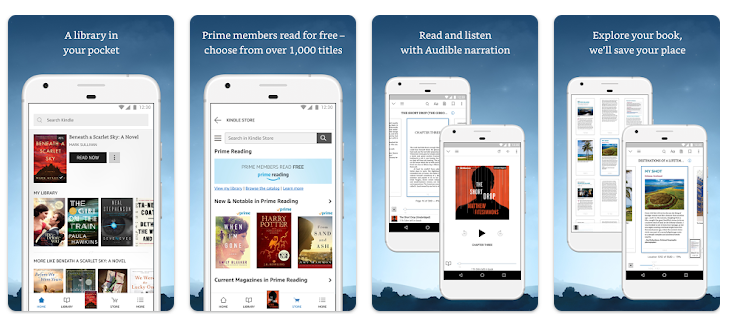
Amazon Kindle is one of the most popular reading apps in the world. While it’s known for its paid ebooks, Kindle also offers a wide selection of free titles through its Kindle Store. From timeless literary classics to indie publications, there’s something for every reader.
Key Features:
- Access to thousands of free public domain books
- Built-in dictionary, translator, and Wikipedia lookup
- Customizable reading settings (fonts, margins, background color)
- Syncs reading progress across devices
- Download books for offline reading.
Kindle is ideal for users who want a high-quality, distraction-free reading experience with access to both paid and free books.
2. Google Play Books
Available on: Android & iOS
Best for: Cross-platform reading and book samples
Google Play Books allows users to purchase, download, and read books with ease. However, it also has a considerable collection of free ebooks available in the store. You can browse by category and filter for free books, including everything from fiction and fantasy to science and technology.
Key Features:
- Free ebooks and book previews
- Syncs with your Google account across all devices
- Offers both ebook and audiobook versions
- Night light and customizable reading mode
- Annotation and highlighting tools
Google Play Books offers a seamless and intuitive reading experience, seamlessly integrating with the Google ecosystem, making it one of the best apps to read books for free.
3. Libby, by OverDrive
Available on: Android & iOS
Best for: Borrowing ebooks and audiobooks from your local library
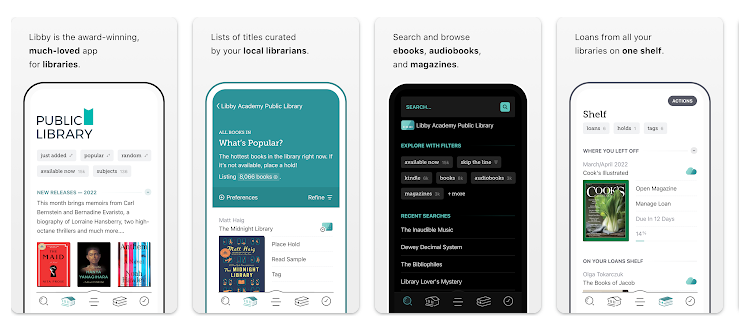
Libby is one of the best apps to read books for free, particularly for book lovers who have a library card. Developed by OverDrive, Libby lets users borrow digital books, audiobooks, and magazines for free from participating libraries worldwide.
Key Features:
- Borrow ebooks and audiobooks instantly
- Adjustable font size, background color, and text spacing
- Listen to audiobooks in the same app
- Download for offline access
- Built-in reading tracker and bookmarks
Libby merges the joy of traditional library borrowing with the convenience of digital technology.
4. Wattpad
Available on: Android & iOS
Best for: Original stories and community-driven content
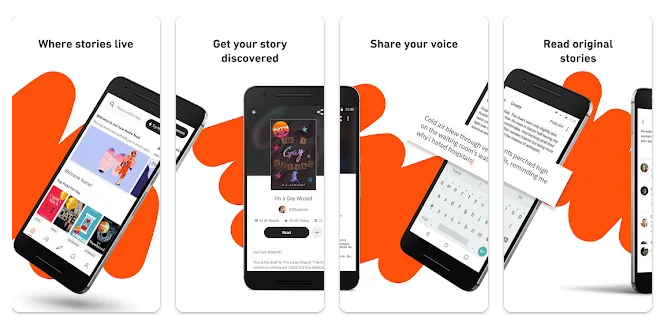
Wattpad is a storytelling platform where both amateur and professional writers publish their work, making it one of the best apps to read books for free and publish authors’ work. With millions of free stories available across genres like romance, fantasy, horror, and science fiction, Wattpad offers a vibrant and engaging reading experience.
Key Features:
- Free access to millions of user-generated stories
- An interactive community, comment on chapters and fellow writers.
- Personalized recommendations based on your interests
- Offline reading support
- Write and publish your own stories
Wattpad is ideal for readers who enjoy discovering new voices and immersive, serialized storytelling.
5. Audible (Free Section)
Available on: Android & iOS
Best for: Free audiobooks and spoken word content
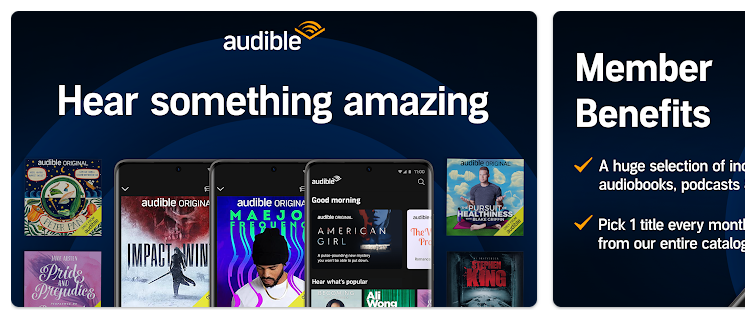
While Audible is a subscription-based service, it also offers a selection of free audiobooks, particularly for children and during promotional periods. You’ll find classics, educational material, and short-form audio content in its free section.
Key Features:
- High-quality audio recordings
- Adjustable playback speed
- Sleep timer and bookmarks
- Sync progress across devices
- Offline listening available
If you’re more into listening than reading, Audible’s free offerings provide a polished audio experience.
6. Scribd (Free Trials + Public Domain)
Available on: Android & iOS
Best for: Access to books, audiobooks, and documents
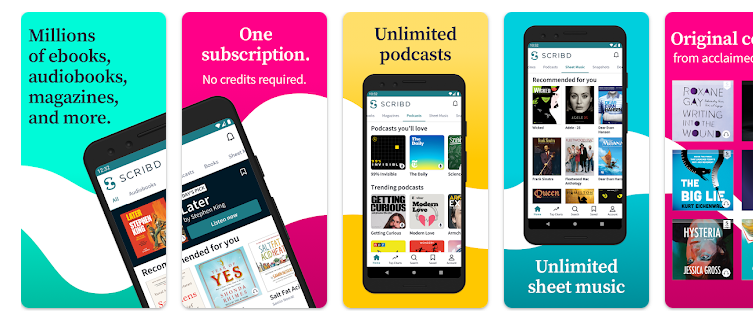
Scribd is a versatile app with ebooks, audiobooks, magazines, and even academic documents. Although it’s a subscription service, Scribd offers a 30-day free trial, during which users can access its entire library. Additionally, you can find free public domain titles without a subscription.
Key Features:
- Unlimited access during the trial period
- Access to ebooks, audiobooks, sheet music, and more
- Cloud bookmarks and synced reading
- Night mode and reading customization
- Offline access
It’s a great temporary solution for binge readers or researchers looking for diverse content.
7. Goodreads
Available on: Android & iOS
Best for: Discovering new books and reading free samples
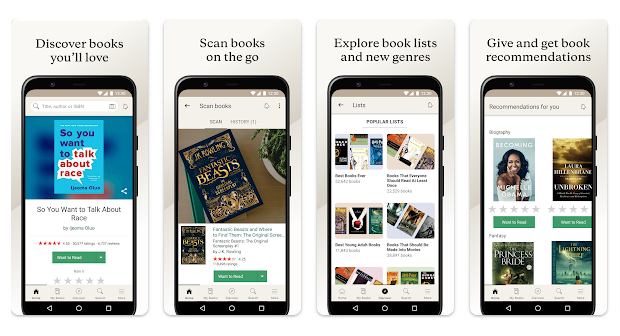
Goodreads is more of a social network for book lovers, but it also allows users to read free sample chapters and find links to free ebooks. You can also join community reading challenges and discover lesser-known gems through reviews and recommendations.
Key Features:
- Book tracking, reviews, and recommendations
- Free sample chapters and links to free ebooks
- Join book clubs and reading groups
- Customizable bookshelves
- Reading goal tracker
Goodreads is a helpful tool for discovering your next favorite book, especially when you’re browsing for free options.
8. Kobo Books
Available on: Android & iOS
Best for: Free international books and multilingual content
Rakuten Kobo’s app offers thousands of free ebooks in various languages and genres. The app syncs your reading progress across devices and allows you to shop from a wide catalog of free and paid titles.
Key Features:
- Wide selection of free ebooks
- Reading customization tools
- Sync across multiple devices
- In-app stats to track reading time and pages read
- Supports multiple languages
Kobo Books is an excellent alternative to Kindle, particularly for users outside the U.S. or those seeking non-English content.
9. Inkitt
Available on: Android & iOS
Best for: Discovering hidden literary gems and indie authors
Inkitt is a platform for readers who want to discover new, unpublished stories, making it the best app to read books for free. All books on Inkitt are free, and the platform uses an algorithm to recommend stories based on your preferences.
Key Features:
- 100% free access to all books
- Focused on sci-fi, fantasy, thriller, and romance
- Offline reading support
- Smart recommendation engine
- Writers can publish their own stories
For readers who want to support emerging authors and explore unique narratives, Inkitt is a treasure trove.
10. ManyBooks
Available on: Android & iOS (via browser or e-reader apps)
Best for: Classic literature and public domain ebooks
ManyBooks offers a vast collection of free ebooks, primarily comprising classics and public domain works. While it’s best known as a website, its content can also be accessed through various e-reader apps, such as Kindle, Kobo, or Moon+ Reader.
Key Features:
- Over 50,000 free books
- Download in multiple formats (ePub, PDF, Kindle)
- Genre-specific browsing
- Community reviews and ratings
- Compatible with most ebook readers
If you’re a fan of authors like Jane Austen, Mark Twain, or Leo Tolstoy, ManyBooks is the perfect platform to revisit timeless works.
How to Build an App to Read Books
In an era where digital convenience is paramount, apps for reading books are gaining popularity. Readers now seek a simple, engaging, and accessible platform to enjoy their favorite books at any time, anywhere. If you’re planning to build your app for reading books, this blog will guide you through the process, from core features to development costs, and help you compete with the best apps to read books for free, like Kindle, Wattpad, and Google Play Books.
Why Build a Book Reading App?
With the global eBook market expected to reach $32.19 billion by 2032, there’s a growing demand for mobile solutions that provide seamless reading experiences. Building your book reading app not only allows you to enter a booming industry but also provides monetization opportunities through subscriptions, ads, and premium content.
Core Features of an App for Reading Books
To compete with the best apps to read books for free, your app needs to offer a smooth and enjoyable reading experience. Here are the essential features to include:
1. User Registration & Profiles
Allow users to sign up using their email addresses or social accounts and manage their libraries, reading history, and bookmarks.
2. eBook Library
Offer a wide selection of eBooks categorized by genre, author, popularity, and user ratings. Include options for free and premium content.
3. Search & Filter
A powerful search engine helps users quickly find books by title, author, or keyword. Filters can refine results by genre, price, length, and more.
4. Reader Mode & Customization
Include customizable reading options such as:
- Font size and type
- Light, dark, and sepia themes
- Adjustable line spacing
- Text-to-speech mode
5. Offline Reading
Let users download eBooks to read without an internet connection, a feature found in the top apps for reading books.
6. Bookmarks & Annotations
Readers should be able to highlight text, write notes, and bookmark pages for easy reference.
7. Sync Across Devices
Sync reading progress, bookmarks, and notes across multiple devices for a seamless experience.
8. In-App Purchases & Subscription Models
Allow users to buy individual books or subscribe to monthly plans for unlimited access. You can offer:
- Free version with limited access
- Premium subscription for full access
- One-time book purchases
9. Push Notifications
Notify users about new releases, recommendations, reading milestones, or special discounts.
10. Admin Panel
Manage content, users, book uploads, payment gateways, and analytics with a robust backend dashboard.
Advanced Features By Using Emerging Technologies
1. AI-Powered Personalized Recommendations
Using machine learning and user behavior analysis, the app can offer highly personalized book suggestions based on:
- Reading history
- Mood detection via sentiment analysis
- Genre preferences and reading time patterns
Benefit: Readers discover more relevant content effortlessly, increasing engagement and time spent in the app.
2. Voice Interaction & AI Assistants
Integrate voice-based AI assistants (like ChatGPT or Alexa) into the reading app to:
- Summarize chapters
- Explain complex vocabulary or concepts
- Suggest similar books in real time
Benefit: Makes reading more interactive and helpful, especially for learners and visually impaired users.
3. AR Book Previews or Visual Enhancements
Augmented Reality (AR) can bring book covers or pages to life by:
- Showing animated previews of the story
- Overlaying illustrations or 3D elements on the page (great for kids’ books or science content)
Benefit: Engages younger audiences and visual learners with immersive storytelling.
4. Real-Time Language Translation & Multilingual Reading
With real-time AI translation:
- Readers can switch languages on the go
- Read bilingual side-by-side versions
- Tap on words or sentences for instant translation
Benefit: Breaks language barriers and supports global accessibility.
5. AI Narration for Any Ebook
Instead of relying on pre-recorded audiobooks:
- Use AI voice generators to narrate any ebook in the app
- Let users choose narration styles, accents, or even celebrity voices
Benefit: Turns any book into an audiobook instantly, saving time and cost for publishers.
6. Eye-Tracking & Adaptive Display
Using the front camera and eye-tracking technology:
- Adjust screen brightness or font size automatically
- Pause reading when the user looks away
- Offer suggestions when the user lingers on a paragraph too long
Benefit: Enhances accessibility and reading comfort.
7. Gamification Using Blockchain or NFT Rewards
Introduce blockchain-backed achievement systems where users earn:
- NFT badges or tokens for completing books
- Points for writing reviews or referring friends
Benefit: Encourages consistent reading habits and community engagement.
8. Smart Reading Analytics & Insights
Powered by AI and data visualization, the app can provide:
- Weekly reading reports
- Most highlighted phrases or quotes
- Reading speed insights and improvement tips
Benefit: Helps readers track progress, set goals, and stay motivated.
9. Community-Driven Live Book Clubs (with Metaverse Support)
Using metaverse or VR capabilities:
- Host live, immersive book club meetups
- Let users interact with avatars in virtual libraries or themed reading rooms
Benefit: Builds a social, engaging atmosphere around reading.
10. Contextual Content with Generative AI
Use generative AI to:
- Provide character backstories
- Explain historical or cultural references in the text
- Offer alternative endings or extended content
Benefit: Deepens reader immersion and turns passive reading into an interactive experience.
Tech Stack for Book Reading App Development
Choosing the right technology is crucial. Here’s a recommended stack:
| Component | Technology |
| Frontend | Flutter, React Native (for cross-platform) |
| Backend | Node.js, Django, or Laravel |
| Database | Firebase, PostgreSQL, MongoDB |
| Cloud Storage | AWS S3, Firebase Storage |
| Payment Gateway | Stripe, PayPal, Razorpay |
| Authentication | Firebase Auth, OAuth2 |
| Admin Panel | React.js or Angular + REST APIs |
How Much Does It Cost to Build a Book Reading App?
The cost to build an app for reading books can vary based on the features, platform, location of the development team, and the complexity of the project.
Here’s a breakdown:
| Development Phase | Estimated Cost (USD) |
| UI/UX Design | $2,000 – $5,000 |
| App Development | $10,000 – $25,000 |
| Backend Development | $5,000 – $15,000 |
| eBook Reader Integration | $3,000 – $8,000 |
| Admin Panel | $3,000 – $7,000 |
| Testing & QA | $2,000 – $5,000 |
| Total (MVP Version) | $25,000 – $65,000 |
Additional Cost Factors:
Platform: Native development for iOS and Android costs more than cross-platform development.
Advanced Features: Text-to-speech, AI-powered recommendations, and cloud sync add to the cost.
Maintenance: Around 15-20% of the initial development cost annually.
Monetization Strategies
- To make your investment profitable, here are a few monetization options:
- Freemium Model: Offer basic content for free and charge for premium features.
- Ads: Run Google AdMob or native ads in the free version.
- Subscription Plans: Weekly, monthly, or annual access to the entire book library.
- In-App Purchases: Sell individual eBooks or collections.
- Affiliate Links: Link to Amazon or book retailers and earn commissions.
Examples of the Best Apps to Read Books for Free
To gain insights, analyze existing apps that are dominating the market:
Amazon Kindle – Offers a massive collection, cloud sync, and personalization.
Wattpad – Great for community-driven reading and writing.
Google Play Books – Seamless integration with Android devices and offers both free & paid books.
Libby – Connects users with local libraries for free eBook rentals.
Each of these book reading apps offers a unique user experience and monetization approach. Use them for inspiration, but add your unique value proposition to make it truly your own.
Bottom Line
Thanks to these incredible apps, reading is no longer restricted by budget or location. Whether you’re curled up at home or commuting on the go, these free book apps ensure that knowledge, entertainment, and literary adventure are always within reach. Choose the app that suits your preferences and start turning virtual pages today!
Building a successful app for reading books requires more than just a good design. You need engaging features, scalable architecture, and a deep understanding of user preferences. Whether you’re targeting students, professionals, or casual readers, focusing on a rich reading experience and competitive pricing model can help you stand out among the best apps to read books for free.
If you have a vision and want to create a feature-rich, scalable app for book lovers, now is the perfect time. Hire MMC Global for professional mobile app development services, helping businesses thrive through digital transformation. If you have any app development ideas, let’s share them with us. Our expert developer will help you turn it into a potential million-dollar app development.