With over 200 million active users each month, Discord has become one of the most popular communication apps today. But as more people use it, many are starting to look for other options that suit their personal or professional needs better.
So far, Discord has raised a massive $995.41 million in funding, including $500 million in its latest round. While that’s impressive, it raises the question can other apps offer the same features and strong community vibe?
Discord also brings in around $600 million in revenue every year and is expected to keep growing fast. Still, it’s not always the perfect fit for everyone.
Some users want tools focused on gaming. Others need apps for work, remote teams, or just casual conversations. That’s why the demand for apps like Discord is growingpeople want choices that match their goals and how they connect with others.
In this blog, we’ve put together a list of the top 25 Discord alternatives. These apps can help you improve communication, build stronger communities, or simply try something new.
Let’s go through these Discord alternatives one by one and find the right match for your needs. If you’re planning to build a similar platform, our application development company is here to guide you every step of the way.
Let’s jump right in and explore the best apps like Discord for 2025!
25 Best Apps Like Discord to Explore in 2025
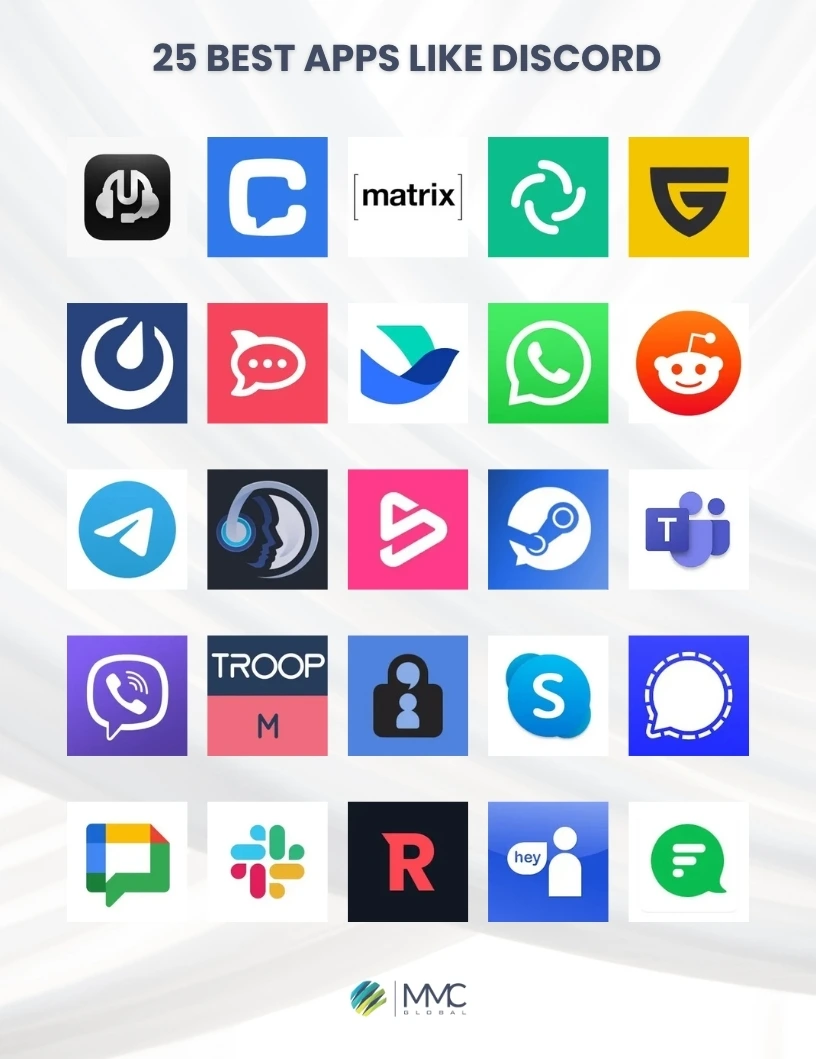
Here’s a quick roundup of the top 25 apps like Discord that you should definitely keep an eye on in 2025. These alternatives offer great features for chatting, voice calls, video meetings, and more whether you’re gaming, working, or just catching up with friends.
1. Lark – A Smart App for Chat, Meetings, and Teamwork

Looking for a Discord alternative that helps you work better with your team? Lark could be just what you need.
Built mainly for businesses, Lark brings messaging, video calls, and productivity tools together in one easy-to-use app.
You can create group chats, share files, and host meetings all in the same place no need to switch between different apps.
One standout feature of Lark is its built-in docs and calendar. It lets you work on documents with your team in real time and plan meetings without extra effort.
If your team wants to stay organized and connected, Lark offers a smooth, all-in-one solution.
Key Features of Lark
- Messaging, video calls, and collaboration in one app
- Real-time document editing and sharing
- Built-in calendar and meeting scheduler
- Free plan for small teams; paid plans from $12/user/month
- Workflow tools and automation to boost productivity
Pricing
Lark offers a free plan with basic tools. To unlock advanced options like more storage and admin features, paid plans begin at $12 per user each month.
Pros & Cons of Lark
| Pros | Cons |
| Combines chat, docs, and meetings in one app | Fewer customization options |
| Free version for small teams | Some useful tools need a paid plan |
| Real-time teamwork on documents | May take time to learn at first |
| Easy meeting setup with in-app calendar | Not as widely known or used |
2. Slack – A Trusted Messaging Tool for Team Communication

If you’re searching for a more work-focused Discord alternative, Slack is one of the best options out there.
It’s widely used by teams and companies to keep their conversations organized and productive. With Slack, you can create channels for different projects, departments, or topics—keeping everything in one place.
Its clean design makes it simple to follow chats and find shared files quickly.
What makes Slack stand out is how well it works with other tools.
You can connect it to thousands of apps like Google Drive, Trello, Zoom, and more—making it a powerful tool for collaboration and task management.
Key Features of Slack
- Create channels for projects and teams
- Works with 2,000+ popular apps
- Share files and search old messages easily
- Free plan available; paid plans start at $6.67/user/month
- Set custom alerts and use automation tools
Pricing
Slack’s free version works well for small teams, but to unlock unlimited history, better admin tools, and more integrations, the paid plan starts at $6.67 per user per month.
Pros & Cons of Slack
| Pros | Cons |
| Simple, easy-to-use design | Free version has limits |
| Works with many tools and apps | Can get expensive for big teams |
| File sharing and message search | Too many alerts can be distracting |
| Channels keep discussions organized | Free plan limits message history |
Bonus Read: Check out our latest blog on “Best apps like Pinterest”
3. WhatsApp – A Simple and Trusted App for Everyday Communication

Looking for a simple app like Discord for chatting? WhatsApp is one of the most popular choices out there.
It’s best known for messaging, voice notes, and video calls. Whether you’re talking with friends, family, or a team, WhatsApp makes it easy to stay in touch.
While it doesn’t have the community-building features of Discord, its ease of use and massive user base make it a great option for group chats and small team communication.
You can create group chats with up to 1024 members, send files, photos, and even share your live location with others.
The best part? Apps like WhatsApp is completely free, with no hidden fees or subscription plans.
So, if you want a reliable, user-friendly Discord alternative for everyday use, WhatsApp is worth checking out.
Key Features of WhatsApp
- Free voice, video, and text messaging
- Group chats with up to 1024 people
- End-to-end encryption for safe communication
- Share images, files, and live locations
- Works on both mobile and desktop
Pricing
WhatsApp is 100% free to use with no paid version or premium add-ons.
Pros & Cons of WhatsApp
| Pros | Cons |
| Totally free to use | Doesn’t support large community features |
| Simple and user-friendly | No advanced settings or tools |
| Supports calling and messaging | Not the best fit for work-related tasks |
| Strong privacy with encryption | No tools for document collaboration |
4. Rocket.Chat – A Flexible Open-Source Chat Platform for Teams

If you want a Discord alternative that gives you full control, Rocket.Chat is a strong choice.
This open-source app lets you host your own server, so you manage your data and privacy completely.
You can create channels, send private messages, and even hold video calls, making it useful for both work and personal chats.
What makes Rocket.Chat special is how flexible it is. You can customize almost everything from the look of the app to adding third-party tools that fit your workflow.
It’s a great option if you want a app like Discord but with more control and personalization.
Key Features of Rocket.Chat
- Open-source and self-hosted for full control
- Supports channels, direct messaging, and video calls
- Highly customizable design and features
- Free self-hosted plan; paid plans start at $3 per user/month
- Works with apps like Jira and GitHub
Pricing
Rocket.Chat offers a free plan if you host it yourself. Paid plans with extra business features start at $3 per user monthly.
Pros & Cons of Rocket.Chat
| Pros | Cons |
| Full control over your data | Needs technical skills to install and manage |
| Can customize the interface and features | Smaller community than Discord |
| Open-source and free self-hosted option | Some features require paid plans |
| Supports many third-party integrations | Requires ongoing maintenance |
Also Read: Top Apps like Snapchat
5. TeamSpeak – A Great Voice Chat App for Gamers

If you want clear and reliable voice chat, TeamSpeak is a favorite among gamers. It’s built to support large groups and offers excellent voice quality with very low delay, which is why many gamers and online communities choose it.
You have full control over your server, letting you manage who can do what with easy permission settings.
The app’s interface is simple and beginner-friendly. While it doesn’t have many modern text features, its voice chat quality makes it stand out for gaming.
Because of this, TeamSpeak remains one of the best Discord alternatives for gamers.
Key Features
- High-quality, low-latency voice communication
- Customizable server controls and user permissions
- Text chat and file sharing for teamwork
- Works on Windows, macOS, and Linux
- 3D surround sound for a more immersive experience
Pricing
TeamSpeak has a free version with limited features. Server hosting plans start at $55 per year, or you can use free hosting but with fewer user slots.
Pros & Cons of TeamSpeak
| Pros | Cons |
| Excellent voice quality with minimal delay | Lacks advanced messaging options |
| Flexible server controls and permissions | Setup can be tricky for new users |
| Encrypted and secure communication | User interface looks outdated |
| Available on multiple platforms | Needs third-party server hosting |
6. Chanty – Easy and Effective Team Chat

If you want a simple alternative to Discord for team work, Chanty is a great choice.
This lightweight chat app focuses on keeping communication clear and boosting productivity. It supports text, voice, and video calls, making it ideal for small and medium teams.
You can even manage tasks right from your chats, which helps keep projects on track.
Chanty also connects easily with popular apps like Trello and Google Drive to keep your workflow smooth.
While it doesn’t offer big community features like Discord, it’s a solid option for teams looking for a straightforward chat tool.
Key Features
- Task management built into the chat
- Voice and video calls for meetings
- Unlimited message history with quick search
- Integrations with Trello, Google Drive, and more
- Clean and simple user interface
Pricing
Chanty has a free plan for small teams with basic features. The paid business plan costs $3 per user per month and includes more advanced tools and integrations.
Pros & Cons of Chanty
| Pros | Cons |
| Task management inside chat | Doesn’t support large communities or gaming |
| Easy to use and friendly interface | No option for custom server hosting |
| Affordable for small teams | Less customization available |
| Unlimited message history even on free plan | Smaller user base than Discord |
Also Read: Best Tiktok Alternatives
7. Mumble – Open-Source Voice Chat for Low Delay
If you need voice chat with very low delay, Mumble is a great pick. It’s an open-source app famous for clear sound and quick responses.
Because it’s lightweight, many gamers and groups use it for smooth voice communication.
Mumble includes features like positional audio, which adds realism to gaming by showing where sounds come from. Its interface is a bit old-fashioned and may take some time for new users to get used to. Still, it’s a strong Discord alternative if you care more about performance than looks.
Overall, Mumble is a solid choice to replace Discord for voice chat.
Key Features
- Low-delay voice chat with clear audio
- Positional audio for better gaming experience
- Secure conversations with end-to-end encryption
- Custom servers and permission controls
- Open-source and free to use
Pricing
Mumble is fully free. You might need to pay if you want someone else to host your server, and prices depend on the hosting provider.
Pros & Cons of Mumble
| Pros | Cons |
| Clear voice chat with very low delay | Interface looks outdated and can be tricky |
| Secure calls with encryption | No options for text or video chat |
| Positional audio great for gamers | Requires separate server hosting |
| Free and open-source software | Smaller user community |
Also Read: Apps Like Instagram
8. Skype – A Reliable Chat and Video App for Everyone
When it comes to flexible communication tools like Discord, Skype has been popular for many years. It offers voice calls, video chats, and text messaging, making it useful for both personal and work conversations.
Although it’s not focused on gaming, Skype is great for group calls and meetings.
You can have video calls with up to 100 people, which works well for team meetings or family gatherings.
It also lets you share files and your screen easily during calls. However, it doesn’t have some of the advanced features that Discord offers, so it’s less ideal for gamers or big communities. Still, Skype is a well-known free alternative to Discord.
Key Features
- Voice, video, and text messaging all in one
- Group video calls with up to 100 participants
- Easy file and screen sharing
- Works well with Microsoft apps like Outlook
- Available on both desktop and mobile
Pricing
Most Skype features are free. For international phone calls, plans start at $2.99 per month, depending on your location.
Pros & Cons of Skype
| Pros | Cons |
| Supports voice, video, and text chat | Not made for gaming or large communities |
| Can host large group video calls | Slightly slower than Discord at times |
| Simple file and screen sharing | Uses more system resources |
| Works across many devices | Limited options to customize |
Also Read: Top Apps like Omegle
9. Telegram – A Fast and Reliable Messaging App

If you’re looking for an app that’s faster and simpler than Discord for messaging, Telegram is a strong choice.
It’s known for its speed and dependability, letting you send messages, make voice calls, and share media instantly without delays.
Telegram works smoothly on many devices and doesn’t rely heavily on internet speed.
Besides regular chats, it supports very large groups and public channels, making it perfect for communities and big discussions.
One cool feature is its cloud storage, so your messages are saved online, plus self-destructing messages for added privacy.
Overall, whether you want an app like Discord for personal chatting or professional networking, Telegram offers a smooth experience.
Key Features of Telegram
- Superfast messaging with instant delivery
- Supports large groups and public channels
- Secret chats with end-to-end encryption
- Unlimited cloud storage for chats
- Self-destructing messages for privacy
Pricing
Telegram is free to use. There’s also a Premium plan for $5 per month with perks like bigger file uploads and faster downloads.
Pros & Cons of Telegram
| Pros | Cons |
| Very fast message delivery | Not all chats are end-to-end encrypted by default |
| Handles large groups easily | Lacks some advanced business tools |
| Cloud storage makes chat access easy | Blocked in some countries |
| Works well across multiple devices | Less common in professional settings |
10. Microsoft Teams – A Powerful Tool for Work Collaboration
Microsoft Teams is a strong platform designed mainly for professional use.
It brings together video meetings, chat, and file sharing all in one easy-to-use app.
Thanks to its close connection with Microsoft 365, it works better than Discord for businesses that use Office tools.
With Teams, you can work on documents together, manage projects, and communicate instantly.
It supports both small groups and large companies, making it a top choice for organized teamwork and smooth collaboration.
From managing projects to quick team chats, Microsoft Teams covers all office communication needs and stands out among Discord alternatives.
Key Features of Microsoft Teams
- Works seamlessly with Microsoft 365 apps
- Video calls and live events for big groups
- Channels for focused team discussions and file sharing
- Real-time document collaboration inside the app
- Strong security and compliance for businesses
Pricing
Teams has a free plan with basic tools. Paid plans start at $4 per user per month, and Microsoft 365 Business Basic, with more features, costs $6 per user per month.
Pros & Cons of Microsoft Teams
| Pros | Cons |
| Smooth integration with Microsoft tools | Can be hard to learn at first |
| Supports large meetings and live events | Needs a Microsoft 365 subscription |
| High-quality video and audio | May feel crowded for small teams |
| Strong security and compliance | Limited options for customization |
11. Google Chat – Simple and Effective Work Messaging
Looking for a solid Discord alternative? Google Chat is a reliable option.
It’s made for fast and organized communication at work, with chat rooms, private messages, and threaded conversations to keep discussions clear.
Because it connects smoothly with Google Workspace, you can easily access files, calendars, and other tools without any hassle.
Google Chat supports both one-on-one chats and group conversations, making it great for individuals and businesses alike.
With its clean and easy-to-use design, users can quickly get started and collaborate with others without problems. This app is becoming popular among the best Discord competitors.
Overall, Google Chat is an excellent choice for teams already using Google services.
Key Features of Google Chat
- Works well with Google Workspace apps
- Private messages and group chat rooms
- Threaded conversations for clear discussions
- Smart reply suggestions for quick answers
- Secure collaboration with Google’s safety features
Pricing
Google Chat comes with Google Workspace plans. Prices start at $6 per user each month with the Business Starter plan, which includes extra features and storage.
Pros & Cons of Google Chat
| Pros | Cons |
| Easy to connect with Google services | Fewer features than some rivals |
| Simple and user-friendly design | Requires a Google Workspace account |
| Threaded chats keep talks organized | Not ideal for very large companies |
| Smart replies save time | Limited ways to customize |
Read more: How To Build Video Conferencing Apps Like Zoom & Google Meet
12. Element – Private and Decentralized Chat for Businesses

Looking for apps like Discord that focus on privacy and control? Element is a great option.
It offers secure messaging with end-to-end encryption, so your conversations stay private. Because it’s decentralized, you can host your own server and have full control over your data.
Element supports group chats, video calls, and file sharing, making it useful for small teams and large companies.
It’s perfect for organizations that want a secure, flexible platform without relying on central servers.
With strong privacy and user control, Element is a trusted choice for confidential business communication.
Key Features of Element
- End-to-end encryption for messages and calls
- Decentralized platform giving control over data
- Group chats, video calls, and file sharing
- Open-source with frequent updates
- Available on web, desktop, and mobile
Pricing
Element is free for personal use and small teams. Business hosting plans start at $2 per user each month, with options for custom servers.
Pros & Cons of Element
| Pros | Cons |
| Strong security with encryption | Requires technical skills to set up servers |
| Full control over data and hosting | Smaller user base than other apps |
| Flexible communication tools | Interface isn’t very polished |
| Open-source and community-driven | Limited third-party integrations |
Also Read: Top Hand-picked Apps like Venmo
13. Viber – Popular App for Free Calls and Messaging

If you’re looking for apps like Discord on Android, Viber is a strong alternative.
It’s a well-known messaging app that’s been around for a long time, loved for its free calling and texting features.
You can call and message friends and family without paying phone charges, as long as you have a good internet connection.
Viber also lets you easily share texts, photos, and videos, making it a solid choice among apps like Discord.
With fun features like stickers and GIFs, chatting becomes more lively. Plus, it keeps your messages safe with end-to-end encryption.
Viber also offers “Viber Out,” which lets you call people who don’t use Viber at low prices.
Overall, Viber is a great Discord competitor for users who want easy and secure communication.
Key Features of Viber
- Free voice and video calls
- End-to-end encryption for all messages
- Send texts, photos, and videos easily
- Stickers and GIFs for fun chats
- Viber Out for cheap international calls
Pricing
Viber is free to use. Calls through Viber Out are paid but start at low rates depending on the country.
Pros & Cons of Viber
| Pros | Cons |
| Free calls and messaging | Needs internet connection |
| Clear, high-quality voice calls | Has fewer features than some rivals |
| Easy-to-use interface | Ads inside the app can be annoying |
| Strong message encryption | Some features require payment |
14. aTox – Focused on Secure and Private Chat

If you’re searching for Discord alternatives that put privacy first, aTox is a solid option.
This app uses peer-to-peer technology, meaning your messages aren’t stored on any central server, keeping your conversations secure.
It offers text messaging, voice calls, and video calls, making it a complete communication tool for both individuals and groups.
As an open-source app, aTox is transparent and open to improvements from its community.
One unique feature is that you don’t need a phone number to sign up, so you can create an account anonymously.
Overall, aTox is a great choice for people who want safe communication without worrying about corporate spying.
Key Features of aTox
- Peer-to-peer system for better privacy
- End-to-end encryption on all chats and calls
- Sign up anonymously with no phone number needed
- Supports text, voice, and video communication
- Open-source for trust and transparency
Pricing
aTox is totally free to use.
Pros & Cons of aTox
| Pros | Cons |
| Strong focus on privacy and security | Small user community |
| No central server storing data | May need tech skills to use well |
| Open-source with community backing | Interface might feel confusing at first |
| Works on many devices | Sometimes connections can be slow |
Also Read: How To Build Apps Like Wizz
15. Flock – Designed for Smooth Team Communication
If you’re looking for Discord alternatives for PC, Flock is a great option for easy team collaboration.
This app makes teamwork simple by combining messaging, task management, and video calls in one place.
You can create different channels for various projects to keep conversations organized.
It also lets you share files and work on them together in real time, making it ideal for teams who need to collaborate closely.
Features like polls and reminders help teams stay focused and on schedule.
Overall, Flock is made to improve team productivity and simplify workflows, placing it among the best chat apps like Discord.
Key Features of Flock
- Real-time messaging and video calling
- Task management with reminders
- File sharing and live collaboration
- Polls and surveys for team input
- Integrates with many third-party apps
Pricing
Flock has a free plan for small teams. Paid plans with extra features start at $4.50 per user per month.
Pros & Cons of Flock
| Pros | Cons |
| Perfect for team collaboration | Free plan has limited features |
| Easy-to-use interface | Can be confusing for new users |
| Connects with other apps easily | Less popular than some rivals |
| Includes task management tools | Sometimes has performance hiccups |
16. Steam Chat – A Great Choice for Gamers

If you’re looking for a good Discord alternative for gaming, Steam Chat is worth checking out.
This chat is built right into the Steam gaming platform, making it easy to stay connected with friends while playing.
It supports both voice and text chat, helping you coordinate your gameplay smoothly.
With group chat features, you can organize multiplayer games and stay in touch with your gaming community.
Because it’s designed for gamers, it enhances your online social experience.
Overall, Steam Chat ranks among the best communication apps like Discord for gamers.
Key Features of Steam Chat
- Built into the Steam gaming platform
- Voice and text chat options
- Group chats for multiplayer games
- Easy friend management and invites
- Access to a large gaming community
Pricing
Steam Chat is free for all Steam users.
Pros & Cons of Steam Chat
| Pros | Cons |
| Works perfectly with Steam games | Only available to Steam users |
| Easy to chat with friends | Missing some advanced features |
| Supports both voice and text | Can get messy in big groups |
| Connects you to a big gamer community | Not meant for non-gaming use |
[Bonus Read]: Best Instacart Alternatives
17. SpaceHey – A Flexible Tool for Team Collaboration
If you’re looking for popular apps like Discord, SpaceHey is worth exploring.
It’s an easy-to-use platform that brings together messaging, task management, and project collaboration in one place.
You can create channels for different projects to keep everything organized.
SpaceHey also supports video calls and file sharing, making teamwork smoother. It’s one of the great chat platforms like Discord that helps teams work better together.
Overall, it’s a good choice for those who want simple but effective collaboration. It ranks among the top apps better than Discord.
Key Features of SpaceHey
- Combines messaging with task management
- Video calls for live communication
- File sharing and document collaboration
- Channels for focused project discussions
- Connects with popular tools like Google Drive
Pricing
SpaceHey offers a free plan for small teams. Paid plans start at $4.99 per user per month.
Pros & Cons of SpaceHey
| Pros | Cons |
| Simple and easy to use | Free plan has limited features |
| Combines chat and tasks | Fewer app integrations than others |
| Supports video calls | Lacks some advanced customization |
| Great for small and medium teams | Can feel overwhelming for beginners |
18. Revolt – A Fresh Choice for Building Communities
If you’re searching for apps like Discord, Revolt is another option to consider. This new platform focuses on community building, letting users create servers just like Discord.
With Revolt, you can easily chat with friends or groups using voice and text channels.
It also offers fun features like custom emojis, reactions, and GIFs to make conversations lively. Overall, it’s a great choice for anyone wanting a community-centered app and ranks among the best Discord alternatives.
Key Features of Revolt
- Customizable servers for communities
- Voice and text channels for chatting
- Supports custom emojis and reactions
- Open-source software for flexibility
- Simple and easy-to-use interface
Pricing
Revolt is free to use now, with plans to add optional paid features later.
Pros & Cons of Revolt
| Pros | Cons |
| Modern and easy design | Still under development |
| Focuses on building communities | Smaller user base than Discord |
| Open-source for customization | Limited features currently |
| Supports custom emojis | May have occasional bugs |
19. Troop Messenger – Secure Team Chat App
Troop Messenger is a secure messaging app that keeps your conversations private with end-to-end encryption. This makes it a strong contender among the best chat apps like Discord.
It lets users send text messages, voice notes, and files, making it a flexible choice for team communication.
The app also supports group chats and video calls, designed especially for businesses to manage tasks and track projects.
Overall, Troop Messenger is a dependable option for teams that value security and smooth collaboration.
Key Features of Troop Messenger
- End-to-end encrypted messaging
- Group chats and voice messaging
- Video calls for meetings
- Task management and project tracking
- Secure file sharing and storage
Pricing
Troop Messenger offers a free trial, with paid plans starting at $2.50 per user per month.
Pros & Cons of Troop Messenger
| Pros | Cons |
| Strong security with encryption | Interface looks a bit outdated |
| Good for team collaboration | Free plan has limited features |
| Includes task management tools | May take time to set up |
| Works on many platforms | Not as popular as some competitors |
20. Reddit – A Hub for Community Talks and Networking

If you’re looking for a solid alternative to websites like Discord, Reddit is worth checking out. It’s a popular social platform where users can find answers quickly and share ideas.
Reddit allows people to join various communities called subreddits based on their interests. Its unique discussion style lets users post questions, share content, and join conversations easily.
You can also send private messages to other users for direct chats.
With a large and diverse user base, Reddit connects people from all over the world.
Overall, Reddit is one of the top sites like Discord and a great place for discussing many different topics. If you want more Reddit alternatives, our latest blog can guide you.
Key Features of Reddit
- Thousands of communities called subreddits
- Post and comment on different topics
- Private messaging between users
- Voting system to highlight popular posts
- Mobile app for easy access anywhere
Pricing
Reddit is free to use. Premium features are available for $5.99 per month.
Pros & Cons of Reddit
| Pros | Cons |
| Large and active user community | Can be overwhelming for new users |
| Covers a wide variety of topics | Moderation sometimes inconsistent |
| Supports private messaging | Some discussions can be toxic |
| Easy to join and participate | Ads may interrupt user experience |
21. StoryPrompt – A Creative Hub for Writers

StoryPrompt is a special platform for creative writers. It’s becoming popular as one of the good Discord alternatives.
This app helps users generate story ideas, writing prompts, and character sketches to get inspired.
With an easy-to-use interface, writers can quickly browse prompts and find motivation to start or continue their projects.
Users can share their stories and ideas, and get feedback from other writers in the community.
This social aspect makes it a helpful tool for beginners and experienced writers who want to boost their creativity and skills.
Key Features of StoryPrompt
- Generates story and character prompts
- Simple and user-friendly interface
- Tools for sharing and collaborating
- Options to receive feedback from the community
- Save and organize your writing projects
Pricing
StoryPrompt offers a free plan with basic features. Premium plans start at $5 per month for extra tools.
Pros & Cons of StoryPrompt
| Pros | Cons |
| Helps generate creative ideas | Free version has limited features |
| Supports collaboration with others | Smaller community than bigger platforms |
| Easy to navigate and use | Might not fit every writing style |
| Organizes your projects well | Can sometimes be distracting |
22. Signal – A Secure Messaging App Focused on Privacy

Signal is a strong alternative to Discord that offers secure messaging with end-to-end encryption. Because of its strong privacy features, many people trust Signal for private and group chats.
Users can send text messages, voice notes, and make calls without worrying about their data being exposed. The app also includes disappearing messages and encrypted video calls for extra security.
In short, Signal is a reliable app for anyone who values privacy in their conversations.
Key Features of Signal
- End-to-end encryption for all messages and calls
- Disappearing messages to protect privacy
- Voice and video call support
- Open-source software for transparency
- Simple and easy-to-use interface
Pricing
Signal is completely free to use.
Pros & Cons of Signal
| Pros | Cons |
| Strong security and privacy | Limited social and community features |
| Easy to use interface | Smaller user base than other apps |
| Open-source for trust and transparency | Needs contacts to fully use all features |
| Disappearing messages for privacy | Some may find it basic compared to others |
23. Mattermost – A Strong Platform for Team Collaboration

Mattermost is a powerful alternative to Discord focused on effective team communication.
It offers messaging, file sharing, and project management all within one platform. Users can create channels for different projects to keep discussions organized.
This platform is highly customizable, letting teams adjust it to fit their specific needs.
Since Mattermost can be self-hosted, organizations have full control over their data and privacy.
Overall, Mattermost is a great choice when looking for Discord alternatives that offer strong collaboration features.
Key Features of Mattermost
- Channels for organized team chats
- File sharing and document collaboration
- Self-hosting option for data control
- Customizable user interface
- Integration with many third-party apps
Pricing
Mattermost has a free version available. Paid plans start at $10 per user per month for more advanced features.
Pros & Cons of Mattermost
| Pros | Cons |
| Highly customizable | Can be tricky to set up |
| Great tools for team collaboration | May be complex for beginners |
| Self-hosting gives data control | Limited support on free plan |
| Works well with other apps | Requires maintenance if self-hosted |
24. Guilded – A Gaming Community Platform

Guilded is made especially for gamers, offering a platform designed to support gaming communities.
It includes features like event scheduling, team management, and voice chat to improve the gaming experience.
Players can easily connect and organize their gaming sessions.
Besides voice chat, Guilded offers tools for creating forums and managing team rosters, making it a flexible app like Discord for gaming groups and clans.
It also integrates with popular games to help users track stats and schedules.
Overall, Guilded is growing quickly as one of the top apps like Discord for gamers.
Key Features of Guilded
- Schedule events for game sessions
- Manage teams and rosters
- Voice and video chat options
- Game integration for tracking stats
- Customizable servers for gaming communities
Pricing
Guilded is free to use, with optional premium features available.
Pros & Cons of Guilded
| Pros | Cons |
| Built specifically for gamers | Smaller community than Discord |
| Easy event and team management | Some features limited on free plan |
| Voice and video chat available | Less well-known outside gaming circles |
| Integrates with popular games | Lacks some general social features |
25. Matrix Chat – A Decentralized and Secure Messaging Platform
Matrix is an open-source platform that offers decentralized communication with strong privacy.
Users can send messages, make voice calls, and video calls while keeping their data secure.
Its flexible design supports multiple client apps, so users can pick the interface they like best.
Matrix focuses on interoperability, letting users connect with other messaging services easily.
With end-to-end encryption, it ensures conversations stay private and safe.
Overall, Matrix is a great Discord alternative for those wanting a private, customizable communication system.
Key Features of Matrix
- Decentralized system for better control
- End-to-end encryption for secure chats
- Works with different messaging platforms
- Supports various client apps and interfaces
- Open-source for transparency and trust
Pricing
Matrix is free to use, with optional paid hosting services available.
Pros & Cons of Matrix
| Pros | Cons |
| Highly customizable | May be difficult for beginners |
| Strong privacy and encryption | Smaller user base than popular apps |
| Open-source and transparent | Setting up integrations can be tricky |
| Connects with other messaging platforms | Performance depends on the server used |
Why Pick a Discord Alternative?
In today’s world, communication needs vary as much as the groups we belong to. Trying out Discord alternatives can help you find the perfect platform that fits your unique way of working and connecting.
Whether you need strong security for confidential talks or specific tools to manage projects, the right app can change how your team collaborates. That’s why it’s important to explore what each alternative offers.
Here are some key features to think about when choosing a Discord alternative:
| Feature / Aspect | Description |
| Security | Many alternatives focus on protecting your data with end-to-end encryption and two-factor authentication. |
| Scalability | Pick a platform that can grow with your team, adding users and new features as needed. |
| Integration | Look for apps that work well with your current tools to keep your workflow smooth. |
| Ease of Use | Choose platforms with simple and clear designs so your team can start using them quickly. |
| Mobile Access | Make sure the app works well on phones and tablets for remote work and on-the-go collaboration. |
| Customer Support | Good help and detailed guides are important when learning a new tool. |
| Cost | Compare prices and features to find a solution that fits your budget and offers value. |
| Customization | Some platforms let you tailor features and appearance to fit your team’s style. |
| Community Engagement | If building a lively community matters, find apps with tools for events and user interaction. |
Our Top Picks for Discord Alternatives
All the apps like Discord mentioned earlier have many similar features. However, each comes with its own strengths and weaknesses. Here are our favorite four Discord alternatives:
- Slack
- Microsoft Teams
- Telegram
- TeamSpeak
If you want a powerful communication tool, Slack is a great option because it connects smoothly with many productivity apps.
Though mainly made for businesses, Slack’s easy-to-use interface also makes it popular with different communities.
If you want clear channels and strong collaboration features, Slack is one of the best choices.
On the other hand, Microsoft Teams combines chat, video calls, and file sharing all in one place.
It works perfectly with Office 365, so teams using Microsoft products will find it very useful.
For users who want a versatile platform with many features, Microsoft Teams is an excellent Discord alternative.
Telegram stands out for those who care about privacy and security.
With end-to-end encryption and self-destructing messages, it’s perfect for users who want their chats to stay private.
Being cloud-based, Telegram lets you access your chats from any device easily, making it ideal for building communities.
Now, let’s compare these four top Discord alternatives with Discord itself. This will help you understand which one fits your needs best and when to use them.
Top 4 Discord Alternatives – Comparison Overview
| Feature / Criteria | Discord | Slack | Microsoft Teams | Telegram | TeamSpeak |
| Main Purpose | Gaming & community chats | Team collaboration | Business communication | Private messaging | Voice chat for gaming |
| Voice Chat | Yes | Yes | Yes | No | Yes |
| Video Calls | Yes | Yes | Yes | No | Limited |
| Text Chat | Yes | Yes | Yes | Yes | No |
| Channels / Groups | Yes | Yes | Yes | Yes | No |
| File Sharing | Yes | Yes | Yes | Yes | Limited |
| Integrations | Many third-party apps | Wide app support | Office 365 integration | Limited | Few |
| Customization | High (bots, themes) | Moderate | Moderate | Low | Limited |
| Security | Good | Good | Excellent | Excellent | Good |
| Free Version | Yes | Yes (limited) | Yes (limited) | Yes | Yes |
If you’re planning to build a custom app like Discord, MMC Global is here to help.
We focus on creative solutions and user-friendly designs to build a platform that fits your needs perfectly.
Our skilled team works closely with you to bring your vision to life and create an app that stands out in the market.
What’s the Cost to Develop an App Like Discord?
Creating an app similar to Discord can cost quite a bit and varies based on many factors. Typically, the first development phase may range anywhere from $50,000 up to $250,000. The final price depends on how complex the app is and other important elements listed below.
What Affects the Cost of Making Apps Like Discord?
Here are some key factors that impact how much it costs to build an app like Discord:
- Feature Complexity
- Quality of Design
- Choice of Platform (iOS, Android, Web)
- Location of the Development Team
- Technology Used
- Need for Integrations
- Testing and Quality Assurance
- Ongoing Support and Maintenance
Cost Breakdown
| Cost Element | Estimated Price Range |
| Initial Development | $50,000 – $250,000 |
| Advanced Features | Depends on feature choices |
| Design & Testing | Varies with project scope |
| Server Costs | $100 – $5,000 per month |
| Support Team Salaries | Depends on team size |
Final Thoughts
Good communication is important today, so picking the right app matters.
Discord is popular, but many other apps have special features. For example, Slack and Microsoft Teams are great for work and team projects. They help keep things organized and productive.
On the other hand, TeamSpeak and Mumble are perfect for gamers. They offer clear voice chat with very little delay.
If you want private and secure chatting, apps like Telegram and Signal focus on keeping your conversations safe.
When choosing, think about what you need most. Each app has its own strengths that might suit you better.
In the end, the best app is the one that fits how you like to connect with others.
So why wait? Check out our top picks for Discord alternatives and find the one that matches your needs. Don’t forget, Facebook groups are also a good choice for online communities.
FAQ’s (Frequently Asked Questions)
Why pick a Discord alternative?
If Discord isn’t working well for you, trying another app could help. Some alternatives give you better privacy, while others have tools made for certain groups. Depending on what you want, using a different app might make chatting easier and more fun.
What features matter in a Discord alternative?
To have a smooth experience with a Discord alternative, make sure it includes:
- Voice and video calling
- Easy file sharing
- Custom chat groups or rooms
- Strong security and privacy settings
- Support for third-party app connections
Are there free alternatives to Discord?
Yes, there are many free Discord alternatives if you want to save money. Apps like Telegram, Mumble, and Element offer free plans with strong features. You can also try Slack for small groups or Guilded, which is made for gamers. Keep in mind, free versions might have some limits. For extra features, you may need to upgrade to a paid plan.
What is the best Discord alternative for gamers?
For gamers, TeamSpeak is a well-known option. It provides clear voice chats with low delay. Another choice is Mumble, which focuses on secure and smooth communication. If you want a platform made especially for gamers, Guilded is a great pick. It includes features for managing teams and building gaming communities.
Can I use these apps on both mobile and desktop?
Yes, if you want convenience, most Discord alternatives work on both phones and computers. Apps like Telegram, Slack, and Microsoft Teams let you switch easily between devices. This helps you stay connected wherever you go. For gamers, platforms like Guilded and TeamSpeak also support multiple devices, so you can always chat with your group.